BLCKTEC 460T Review: Worth It? (October 2026)
The BLCKTEC 460T is a strong fit for owners who need engine, ABS, SRS and transmission diagnostics plus service resets. Check support for your exact vehicle and planned functions before buying.
On this page (12 sections)
- What does the BLCKTEC 460T do?
- Who should choose the 460T, and who should skip it?
- Which 460T features help with diagnosis?
- Which service functions can the 460T handle?
- What should you verify before buying the BLCKTEC 460T?
- How do you set up and use the 460T?
- What common scanner mistakes should you avoid?
- Can the BLCKTEC 460T clear a check-engine light?
- What does RepairSolutions2 add?
- How does the BLCKTEC 460T compare with alternatives?
- How should you decide if the BLCKTEC 460T is right for you?
- Related guides
The BLCKTEC 460T is a handheld OBD2 scanner for owners who need engine, ABS, SRS and transmission diagnostics plus service resets. It also provides live data, freeze-frame information and RepairSolutions2 app access, with vehicle-specific limits on supported functions.
Before buying, check the scanner against your car’s year, make and model, then verify each job you expect it to handle. General OBD2 compatibility does not guarantee access to every system or reset.
What does the BLCKTEC 460T do?
The BLCKTEC 460T combines four-system diagnostics, live data and more than a dozen service functions in a handheld scanner. Its all-system scan checks supported vehicle modules for trouble codes.
BLCKTEC 460T Code Reader: Best for home mechanics
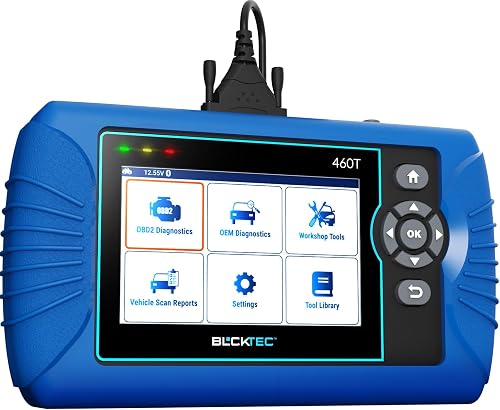
- Engine, ABS, SRS and transmission diagnostics
- 12+ reset functions
- Live data and freeze-frame data
- 4.3-inch screen
A handheld scanner for owners who want several system diagnostics, live data and a broad set of service functions. Confirm the functions you need for your vehicle before buying.
Pros
- Reads and clears codes in four named systems
- Offers live data, freeze-frame data and graphing
- Includes 12+ reset functions
- Free lifetime updates
Cons
- Function availability varies by vehicle
- RepairSolutions2 and the scanner are supported only in the USA and Canada
It supports all 10 OBD2 modes and can read and clear engine, transmission, ABS and SRS codes. The 4.3-inch screen displays diagnostic information, and the box includes an OBD2 cable, storage case and quick-start guide.
BLCKTEC describes AutoVIN, AutoScan and AutoReLink features. When supported by the vehicle, AutoVIN retrieves identification information, while AutoScan and AutoReLink scan control units after connection.
What does the BLCKTEC 460T review score reflect?
The 460T earns a score of 8.6 for its blend of system coverage, data tools and service functions. That combination makes it more capable than a basic engine-code reader, while vehicle-dependent feature support keeps it from being a universal service tool.
Who should choose the 460T, and who should skip it?
Choose the 460T if you work on your own vehicle, want to inspect several systems, and expect to use supported maintenance functions. It suits a home mechanic who wants one handheld device for code checks, live readings and selected service procedures.
Skip it if you only need to read common check-engine codes. A simpler code reader may cover that job without the extra systems and resets you would not use.
It is also a poor fit if your car is outside the supported USA and Canada region, or if BLCKTEC cannot confirm the function you need for your vehicle. For a scan tool comparison by experience level, see our home-use car diagnostic tool guide.
Which 460T features help with diagnosis?
The most useful features for troubleshooting are live data, freeze-frame information and all-system scans. They give you different views of what the vehicle reported and when it recorded a fault.
Live data displays readings as the vehicle runs. The 460T can graph, record, replay and overlay up to four data streams, which can help you compare related readings while investigating a symptom.
Freeze-frame data stores conditions captured when a fault is recorded. Our guide to freeze-frame data on a scan tool explains how to use that snapshot as context.
A trouble code is a starting point, not a complete diagnosis. Read our guide on how to read OBD2 codes before choosing parts or repairs based on a code alone.
Which service functions can the 460T handle?
The 460T offers 12+ service functions, including oil maintenance reset, ABS bleeding, EPB reset, steering-angle sensor recalibration, DPF reset, throttle-body relearn, battery reset or initialization, TPMS relearn, transmission reset, fluid-change reset and maintenance reset.
These functions matter when your vehicle supports them and the job calls for that procedure. A reset or relearn is not a repair, and selecting the wrong procedure can create confusion or affect vehicle operation.
Check support for each specific task before buying. If battery registration is your main need, compare the required procedure with our guide to BMW battery registration tools.
What should you verify before buying the BLCKTEC 460T?
Verify the exact diagnostic system and service task you need for your vehicle’s year, make and model. A claim of OBD2 compatibility does not mean all features work across all OBD2 cars.
BLCKTEC describes compatibility with OBD2-compliant vehicles sold and registered in the USA and Canada from 1996 onward. It also says feature availability varies by vehicle, so use its compatibility checker or contact support with your vehicle details.
Be specific when checking. Ask whether the 460T supports your exact task, such as ABS bleeding or battery initialization, instead of asking only whether it works with your make.
BLCKTEC supports the scanner and RepairSolutions2 app in the USA and Canada only. If you live elsewhere, choose a scanner with confirmed regional support.
How do you set up and use the 460T?
Start by connecting the scanner to the vehicle’s OBD2 port and following the on-screen prompts. Park safely, apply the parking brake and keep the vehicle in the state required by the diagnostic task.
Use the owner’s manual to locate the port if needed, or follow our illustrated guide to finding the OBD2 port. Make sure the connector is seated, then identify the vehicle if AutoVIN does not retrieve its information.
Run a scan and save the codes and freeze-frame details before clearing anything. Record the symptoms and conditions too, so you have useful context if you continue diagnosis or share the report with a repair shop.
For live data, select a small set of relevant readings and watch them under consistent conditions. Overlaying up to four streams can make comparisons easier, but too many unrelated values can make the graph harder to interpret.
What common scanner mistakes should you avoid?
The biggest mistake is clearing a code before saving its details or fixing the cause. Clearing can remove useful diagnostic context, and the warning may return if the fault remains.
Another mistake is assuming a reset function works because the scanner connects to the car. Confirm support for the exact vehicle and procedure first, and follow the vehicle’s service instructions when doing maintenance work.
Do not treat a code description as proof that a named part has failed. Check related readings, symptoms and wiring or connector conditions, and get qualified help when the fault involves a safety system or the cause remains unclear.
Can the BLCKTEC 460T clear a check-engine light?
The 460T can clear supported trouble codes after the underlying problem is addressed. Clearing a code alone does not repair the fault, and the light can come back if the cause remains.
Use a scan tool to gather information, then decide what diagnosis or repair is appropriate. For more context, read what a check-engine light means and how to clear it with a scanner.
What does RepairSolutions2 add?
RepairSolutions2 adds repair guidance and cloud access to scan reports when paired with the 460T. BLCKTEC describes features including a verified-fix database, suggested parts, warranty information, maintenance schedules, technical service bulletins and recall information.
The app is described as free with no subscription fees, and it can store reports for access, sharing or printing. Treat repair suggestions as a starting point, then check that the recommended part or procedure matches the vehicle and fault.
How does the BLCKTEC 460T compare with alternatives?
The 460T is the strongest fit here if you want a broad set of service functions with four-system diagnostics. The alternatives make sense when you prefer a more focused feature set or a different screen style.
The Foxwell NT604 Elite covers engine, ABS, SRS and transmission diagnostics, with live data, AutoVIN and a built-in DTC library. It does not support maintenance resets or relearns, so it suits code diagnosis better than service work.
The TOPDON AD600S also covers four systems and includes 9 service functions. Its 5-inch touchscreen may suit readers who prefer touch controls and a larger display.
The Innova SD35 offers all-system diagnostics, live data, battery and alternator checks, and RepairSolutions2 app guidance. Its screen is 3.5 inches, and Innova advises checking vehicle coverage before relying on a particular feature.
For other handheld options, browse our scanner guide with live data or TOPDON AD600S review.
How should you decide if the BLCKTEC 460T is right for you?
Choose the BLCKTEC 460T if compatibility is confirmed and you will use its multi-system scans, live data or service resets. It offers the widest set of service functions among these picks, making it the most versatile choice for a home mechanic.
Choose the Foxwell NT604 Elite if diagnostics are your main need and resets are not. Pick the TOPDON AD600S if you favor a larger touchscreen, or the Innova SD35 if battery and alternator checks are priorities.
If you are still deciding what kind of scanner fits your car and repair plans, start with our car diagnostic tool buying guide. The key buying rule for the BLCKTEC 460T is simple: confirm the exact function before you pay for it.
Related guides
- Best car diagnostic tools for home use
- Best OBD2 scanners with live data
- TOPDON AD600S review
- Innova 5210 OBD2 scanner review
Frequently asked questions
What systems does the BLCKTEC 460T scan?
The BLCKTEC 460T supports engine, transmission, ABS and SRS diagnostics, along with all 10 OBD2 modes and all-system scanning. Available systems and functions depend on your vehicle's year, make and model, so check compatibility before buying if you need a particular module.
Can the BLCKTEC 460T reset service lights?
The 460T offers 12+ service functions, including oil maintenance, EPB, SAS, DPF, battery and TPMS resets, plus ABS bleeding. Availability varies by vehicle, and a reset does not repair the cause of a warning; diagnose and fix the underlying issue first.
Does the BLCKTEC 460T work outside the USA and Canada?
BLCKTEC supports the 460T and its RepairSolutions2 app only in the USA and Canada. The scanner is described as compatible with OBD2-compliant vehicles sold and registered in those countries from 1996 onward, but specific functions still depend on the vehicle.
How does the BLCKTEC 460T compare with the Foxwell NT604 Elite?
Both scan engine, ABS, SRS and transmission systems and provide live data. The 460T adds 12+ service functions and freeze-frame data, while the Foxwell NT604 Elite focuses on diagnostics and does not support maintenance resets or relearns; choose based on the functions you need.