How to Read OBD2 Codes From Your Car
To learn how to read OBD2 codes, connect a compatible scanner at the car's OBD2 port, turn on the ignition, and retrieve the stored trouble codes. Record each code and use it to guide diagnosis, not to name a failed part.
On this page (9 sections)
- How do you read OBD2 codes with a scanner?
- What does an OBD2 code mean?
- How do you look up a code and decide what to check?
- Should you check freeze frame and live data?
- Which scanner fits the way you read OBD2 codes?
- How do you set up a scanner and avoid common mistakes?
- What should you do before clearing a code?
- When should you get help diagnosing the code?
- How to read OBD2 codes and choose your next step
To learn how to read OBD2 codes, connect a compatible scanner to your car's OBD2 port, turn on the ignition, and follow the tool's prompts to retrieve diagnostic trouble codes. A code identifies a condition the vehicle detected, but it doesn't automatically name the failed part.
Write down the full code and any status shown before clearing anything. Then check its definition, note when the warning appeared, and use symptoms and scan data to decide what to inspect next.
How do you read OBD2 codes with a scanner?
Plug the scanner into the OBD2 port, switch on the ignition, and choose the option to read codes. Follow the instructions for your specific tool and car.
The port is usually inside the cabin, often under the dashboard near the steering column. If you can't find it, use our guide to where the OBD2 port is in a car.
After the scanner connects, select its diagnostic trouble code menu. Save every code exactly as shown, including its letter and all four digits.
Record whether each one is current, stored, pending, or permanent if the tool displays that status.
Some scanners read engine codes only, while others cover additional vehicle systems. Check compatibility for your car's make, model, and year before relying on a tool for a specific module.
What does an OBD2 code mean?
An OBD2 code describes a system, circuit, or condition that the car's computer detected. It narrows the search, but usually doesn't confirm which component needs replacement.
Codes commonly begin with a letter:
- P refers to powertrain codes, including engine and emissions systems.
- B refers to body systems.
- C refers to chassis systems.
- U refers to network or communication issues.
The digits that follow help identify the code within that group. A scanner may show a plain-language description, but use that description as a guide to investigation, not a repair instruction.
For more context about what the warning itself can mean, see what the check engine light means. The light and the code are related clues, but neither replaces diagnosis.
How to read OBD2 code descriptions without guessing
Treat a code description as a direction for diagnosis, not a parts list. A code may point to a circuit or system while several different faults could cause the same result.
Start with the scanner's description, then note the car's symptoms and when they began. Consider whether the issue appeared after fueling, a repair, or a change in driving, and keep those details with the code.
How do you look up a code and decide what to check?
Look up the complete code in a reliable repair reference, then compare its meaning with the car's symptoms and conditions. A definition can point you toward a system without proving the cause.
Note whether the engine was cold or warm, whether the car was moving, and whether the issue appeared after fueling or another recent change. This context can help you or a technician narrow the next checks.
A basic reader may retrieve an engine code. The Foxwell NT301 Code Reader reads and clears engine fault codes and displays live data in graphs.
Don't replace a part based on a code name alone. A wiring fault, connector problem, leak, low voltage, or another condition can sometimes trigger a code associated with a system component.
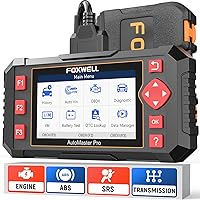
If the code points to a system beyond engine diagnostics, you may need a tool that can access that module. The Foxwell NT604 Elite Scanner covers engine, ABS, SRS, and transmission diagnostics, with compatibility varying by vehicle.
Should you check freeze frame and live data?
Yes, when the scanner and vehicle provide these features, freeze frame and live data can add context to a code. Freeze frame captures vehicle conditions around a fault, while live data shows readings as the vehicle runs.
A freeze frame may help you see details such as engine temperature or speed when a fault was recorded. Save those values before clearing codes; learn more in what freeze frame data is on a scan tool.
Live data can help you compare sensor readings with symptoms. It still takes vehicle-specific knowledge to decide whether a value is expected, so don't treat a single number as a diagnosis.
BlueDriver Bluetooth OBD2 Scanner connects to a phone or tablet and provides live data and freeze frames, with enhanced system access on supported vehicles.
Confirm compatibility for the exact vehicle before choosing a scanner. Coverage can vary by make, model, year, and the system you want to scan.
Which scanner fits the way you read OBD2 codes?
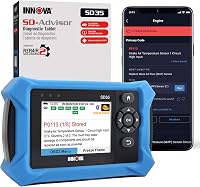
Choose a scanner based on the systems you need to access, the data you plan to use, and whether you prefer a handheld tool or a phone app. Extra features help only when they match your vehicle and the questions you need answered.
- Foxwell NT301: Choose it for engine and emissions code reading, graphing live data, and I/M readiness checks. It suits an owner who wants a straightforward handheld reader; skip it if you need ABS, SRS, transmission, or service functions.
- Foxwell NT604 Elite: Choose it when you want to scan engine, ABS, SRS, and transmission modules in one handheld unit. It suits owners looking beyond engine codes; skip it if you need maintenance resets or relearns such as oil reset, battery registration, or ABS bleeding.
- BlueDriver: Choose it if you prefer a phone or tablet and want live data, freeze frames, and enhanced diagnostics on supported vehicles. It suits someone comfortable using an app; skip it if you want a self-contained handheld scanner or need coverage that hasn't been confirmed for your vehicle.
All three have limits tied to vehicle compatibility. Before buying, check support for your exact year, make, model, and the module you want to scan.
How do you set up a scanner and avoid common mistakes?
Find the port, connect the scanner as directed, and follow its prompts with the ignition in the required position. For a phone-based scanner, install the app and pair the device according to its instructions.
For the NT604 Elite, the scan path is to select a region, choose the car brand and vehicle, run a quick scan, then select the module to diagnose. Its AUTOVIN feature may not work on some older vehicles or certain brands, so enter the VIN manually or choose the vehicle from the diagnostic menu if needed.
Avoid these common errors:
- Don't record only the plain-language description. Save the complete code and its status, since a partial note can point you toward the wrong reference.
- Don't clear codes before saving data. You may lose useful information, and clearing can reset readiness monitors.
- Don't assume every scanner reads every module. Engine access does not guarantee ABS, SRS, or transmission access.
- Don't treat code clearing as a repair. Fix the underlying issue first; if it remains, the code may return.
- Don't guess at compatibility. Confirm the tool supports both your vehicle and the specific diagnostic function you need.
For phone tools, keep your device available during the scan and follow the app's connection prompts. For a wired scanner, avoid pulling on the cable or connector while it is in use.
What should you do before clearing a code?
Record the code, its status, and any available freeze frame data before clearing it. Clearing a code can remove information that would help trace an intermittent fault.
Some tools can clear codes, but clearing doesn't repair the cause. If the issue is still present, the code or warning may return.
Clearing codes can also reset emissions readiness monitors. If you're preparing for an inspection, check readiness status first and avoid clearing codes just to turn off a warning.
For a closer look at the steps and limits, read how to clear the check engine light with a scanner. If a warning light is flashing or the car is running poorly, check your owner's manual and get professional advice before driving.
When should you get help diagnosing the code?
Get help when the code involves a system you can't test, the symptom affects safe driving, or the code returns after a repair. A scan tool retrieves information, but some faults need electrical or mechanical checks.
A mechanic can test a circuit, inspect wiring, or use vehicle-specific service information to confirm the cause. Bring your recorded codes and symptoms so the shop can start with useful details.
If you're weighing a shop visit, our guide to car diagnostic test costs explains what can affect the bill. For warning-light decisions, see whether you can drive with the check engine light on.
How to read OBD2 codes and choose your next step
When you need to know how to read OBD2 codes, retrieve and record the full code, check its definition, and use symptoms and scan data to guide diagnosis. Don't replace a part or erase the evidence based on the code alone.
Pick the NT301 if engine codes and live graphs cover your needs, the NT604 Elite if you need supported ABS, SRS, or transmission access, and BlueDriver if you prefer phone-based scanning. Before buying, confirm compatibility and the functions available for your car.
For a broader comparison of features, start with our plain buying guide to car diagnostic tools. For a different code status, compare pending and stored codes.
Frequently asked questions
How do I read an OBD2 code without a scanner?
Most cars need a compatible scan tool to retrieve OBD2 trouble codes. Some vehicles show limited codes through a built-in display or a key sequence, but the method and coverage vary.
A scanner is the clearer option: connect it at the OBD2 port, switch on the ignition, and follow its prompts.
Does an OBD2 code tell me which part to replace?
No. An OBD2 code points to a detected condition or circuit, and several causes may fit that result.
Check the code definition, symptoms, wiring, and related data before deciding on a repair.
A mechanic can help if the diagnosis needs tests or equipment you don't have.
Should I clear a code after reading it?
Keep the code until you've recorded it and addressed the cause. Clearing codes can erase useful diagnostic information and reset emissions readiness monitors.
After a repair, a scanner can clear the code if the vehicle and tool support that function.
The warning may return if the issue remains.
What is the difference between a pending and stored OBD2 code?
A stored code has met the vehicle's criteria for recording a fault, while a pending code may reflect a problem that has not yet met those criteria. Exact behavior depends on the vehicle.
Read both when available, and compare them with symptoms and freeze frame data before drawing a conclusion.