8 Best OBD2 Scanners With Live Data (October 2026)
The best OBD2 scanners with live data include the OBDLink MX+ Bluetooth Scanner for app flexibility, the BlueDriver Bluetooth OBD2 Scanner for repair reports, and the Innova 5210 Code Reader for engine and battery checks.
On this page (5 sections)
The OBDLink MX+ is the best OBD2 scanner with live data for app flexibility, with real-time data you can graph, log and export. Choose BlueDriver for repair reports and broader code access, or the Foxwell NT301 if you want graphs on a handheld screen.
Live data helps you see what the car's sensors report while the engine runs. It can give you more context than a warning light or stored code alone, but it doesn't prove which part has failed.
For a broader starting point, read our plain guide to car diagnostic tools. If your scanner won't connect, our guide to fixing common OBD2 connection problems can help you check the port, ignition and app setup.
Our picks at a glance
-
1

-
2

-
3

- 4
 Best for live data graphsCheck it
 - 5
 Check it
XTOOL A30M Bluetooth Bidirectional Scanner
Best for live data and active tests - 6
 Check it
Innova SD35 ABS and SRS Scanner
Best for wider system coverage - 7
 Best for app-free basicsCheck it
 - 8
 Best for simple phone-based scansCheck it
How we chose OBD2 scanners with live data
We compared the stated live-data features, display options, system coverage and connection method for each scanner. Our score weighs specs, features and buyer feedback against what you're shopping for.
A useful live-data tool should show values that relate to common engine checks, such as RPM, temperature, fuel trims or oxygen sensor activity. Graphing and logging can help you follow changes, while broader system access matters if you need more than engine diagnostics.
We included both handheld readers and Bluetooth adapters. The right format depends on whether you prefer a built-in screen or want to view data on a phone.
Check compatibility before you buy. OBD2 access and enhanced features vary by vehicle, and a scanner's ability to display data does not replace a diagnosis.
| Product | Best for | Connection | Live data | Extra coverage | Our score |
|---|---|---|---|---|---|
| OBDLink MX+ Bluetooth Scanner | app flexibility | Bluetooth adapter for iPhone, Android or Windows | Access, graph, log and export real-time engine data | Enhanced OEM support varies by make | 9.2 |
| BlueDriver Bluetooth OBD2 Scanner | repair reports | Bluetooth scanner with iOS or Android app | Monitor real-time data while driving | Check Engine, ABS, SRS, TPMS and other supported systems | 9.0 |
| Innova 5210 Code Reader | engine and battery checks | Handheld reader with attached OBD2 cable | RPM, engine temperature, fuel trims and oxygen sensor readings | Battery testing and ABS codes where supported | 8.7 |
| Foxwell NT301 Code Reader | live data graphs | Corded handheld scanner | Graphs and logs RPM, oxygen sensors, fuel trims and coolant temperature | Engine and emissions diagnostics | 8.2 |
| XTOOL A30M Bluetooth Bidirectional Scanner | live data and active tests | Bluetooth scanner for iOS or Android | Graphs up to 8 live data streams at once | Full system scans and service functions vary by vehicle | 8.0 |
| Innova SD35 ABS and SRS Scanner | wider system coverage | Handheld tablet with OBD2 cable | RPM, fuel trims, temperature and oxygen sensor performance | All system diagnostics and service functions vary by vehicle | 7.8 |
| ANCEL AD410 Code Reader | app-free basics | Corded handheld scanner | RPM, coolant temperature, fuel trims and other available engine data | Engine and emissions diagnostics only | 7.6 |
| Veepeak OBDCheck BLE | simple phone-based scans | Bluetooth LE for iOS and Android | Standard OBD2 live sensor data | Vehicle-specific functions depend on vehicle and app | 7.3 |
The best OBD2 scanners with live data
The top picks balance useful live readings with a clear way to view them. Choose the OBDLink MX+ for app flexibility, BlueDriver for repair reports, or Innova for a handheld reader with battery checks.
OBDLink MX+ Bluetooth Scanner: Best for app flexibility
- Graphs, logs and exports real-time engine data
- Works with iPhone, Android and Windows
- Enhanced OEM support for several makes
The OBDLink app can graph, log and export real-time engine data. Its enhanced OEM support and compatibility with several third-party apps make it a flexible choice.
Pros
- Live data graphing, logging and exporting
- Works with iPhone, Android and Windows
- Enhanced OEM support for several brands
Cons
- Requires a compatible phone app or Windows setup
- Check vehicle compatibility and features before buying
The OBDLink MX+ is the strongest fit if you want control over how you view and keep live readings. The OBDLink app can graph, log and export real-time engine data, so you can review a drive or share data for help.
It works with iPhone, Android and Windows devices. OBDLink also recommends it for apps such as FORScan, Torque, BimmerCode, Dashcommand, AlfaOBD and Carista, though compatibility and features depend on the app and vehicle.
Enhanced OEM support covers several makes, including Ford, GM, Mazda, Nissan and Toyota brands, plus Honda, Hyundai and Kia. The scanner can access more live parameters, including ABS, SRS and TPMS, on supported vehicles.
Choose it if you want a flexible adapter for live data and app-based diagnostics. Check OBDLink's troubleshooting guide for your exact vehicle and desired features before you buy.
BlueDriver Bluetooth OBD2 Scanner: Best for repair reports
- Live vehicle data and freeze frames
- Technician-verified repair reports matched to VIN
- Enhanced codes on supported vehicles
BlueDriver combines live data with freeze frames and repair reports matched to the vehicle VIN. Enhanced system access depends on the vehicle.
Pros
- Live data, freeze frames and readiness checks
- Repair reports include causes and confirmed fixes
- No subscription fees
Cons
- Requires an iOS or Android phone or tablet
- Enhanced coverage varies by vehicle
BlueDriver suits drivers who want live readings alongside repair guidance. The app can monitor vehicle data while driving, show freeze frames and check smog readiness.
Its technician-verified repair reports match to your VIN and include definitions, causes and confirmed fixes. BlueDriver also supports enhanced codes for systems such as ABS, SRS, TPMS and transmission on supported vehicles.
The adapter connects to an iOS or Android phone or tablet. BlueDriver says it works with North American gasoline vehicles from 1996 onward and select light diesels, but its compatibility tool is the place to check your specific vehicle.
Pick BlueDriver if repair reports and expanded code access matter as much as live data. If you only need a basic engine code reader, you may not need its broader app features.
Innova 5210 Code Reader: Best for engine and battery checks
- Live readings include RPM, temperature and fuel trims
- Battery and alternator checks
- Engine and some ABS code coverage
The Innova 5210 pairs live engine readings with battery and alternator checks in a handheld reader. ABS coverage varies by vehicle.
Pros
- Handheld screen and attached cable
- Battery testing alongside diagnostics
- Live readings for key engine data
Cons
- ABS coverage varies by vehicle
- Confirm coverage for your exact make, model and year
The Innova 5210 pairs live engine readings with a built-in handheld screen and battery checks. You can view RPM, engine temperature, fuel trims and oxygen sensor readings without relying on a phone display.
It also checks battery and alternator health, which adds a separate use beyond reading engine codes. Innova says it works with most US, Asian and European vehicles from 1996 onward, while ABS code coverage varies.
The 5210 has an attached OBD2 cable and Bluetooth compatibility with the RepairSolutions2 app. Its live data and code functions make it a practical pick for drivers who prefer a handheld reader but still want optional app support.
Choose it if you want live engine readings, battery testing and a simple screen in one tool. Check Innova's coverage checker for your make, model and year, especially if ABS access matters.
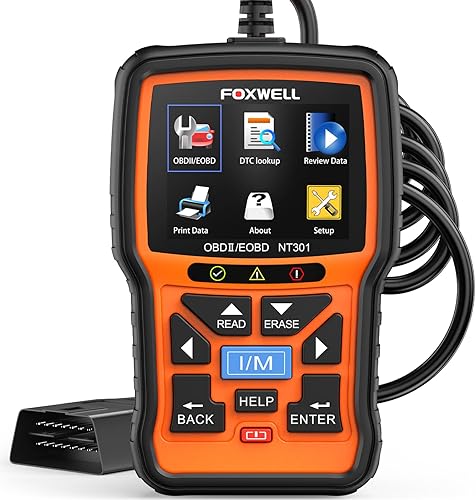
Foxwell NT301 Code Reader: Best for live data graphs
- Graphs and logs live sensor data
- 2.8-inch color screen
- I/M readiness, O2 sensor and EVAP tests
The NT301 shows engine readings in graphs on its built-in screen and can log live data. It focuses on engine and emissions diagnostics.
Pros
- Live data graphing and logging
- Built-in screen, no phone app needed
- I/M readiness, O2 sensor and EVAP tests
Cons
- Does not scan ABS or SRS systems
- Check vehicle compatibility before buying
The Foxwell NT301 suits drivers who want to watch engine data on the scanner itself. Its 2.8-inch color screen graphs and logs readings such as RPM, oxygen sensors, fuel trims and coolant temperature.
The corded handheld reader also supports I/M readiness, O2 sensor and EVAP tests. Those functions can help you review engine and emissions information, but the NT301 does not scan ABS or SRS systems.
Foxwell describes compatibility with most 1996 and newer US gasoline cars, light trucks and SUVs, plus many 2000 and newer European and Asian models. Confirm compatibility for your vehicle before buying.
Choose the NT301 if graphs and a built-in screen matter more than wireless phone use. It focuses on engine and emissions diagnostics rather than wider system coverage.
XTOOL A30M Bluetooth Bidirectional Scanner: Best for live data and active tests
- Graphs up to 8 live data streams
- Full system diagnostics on available systems
- Bidirectional active tests
The A30M graphs up to 8 live data streams at once and adds active tests. Its diagnostics and service functions depend on vehicle support.
Pros
- Graphs multiple live streams together
- Bidirectional active tests
- Full system scans on available vehicle systems
Cons
- Requires a compatible phone or tablet
- Some functions vary by vehicle; verify coverage first
The XTOOL A30M is the strongest choice here for viewing several live readings at once while doing more involved checks. It can graph up to 8 live data streams simultaneously and supports bidirectional active tests.
The scanner connects wirelessly to an iOS or Android phone or tablet. XTOOL also describes full system diagnostics and service functions, including resets and relearns, but those features vary by vehicle.
Its active tests can send commands to supported vehicle components, such as fuel pumps, injectors, A/C clutches and windows. Check compatibility before relying on a particular test or service function.
Pick the A30M if you want live graphs and active tests in a phone-based tool. It may be more scanner than you need if your goal is only to read standard engine data.
Innova SD35 ABS and SRS Scanner: Best for wider system coverage
- Live readings include RPM, fuel trims and temperature
- Scans engine, transmission, ABS and SRS
- Tablet display
The SD35 combines live engine readings with scans of several vehicle systems. Its tablet-style display suits buyers who want a larger screen.
Pros
- Live data with multiple system scans
- Tablet-based interface
- Battery and alternator checks
Cons
- Coverage varies by vehicle
- Confirm supported systems and resets with Innova's coverage checker
The Innova SD35 combines live engine data with scans across several systems. It can show RPM, fuel trims, temperature readings and oxygen sensor performance, with a tablet-style display.
The SD35 is designed to scan engine, transmission, ABS, SRS and other available systems. It also includes battery and alternator tests, plus service functions such as oil reset and TPMS checks, though vehicle coverage varies.
Choose it if you want a larger screen and broader diagnostic coverage in one handheld tool. Use Innova's coverage checker to confirm which systems and service functions work on your exact car.
ANCEL AD410 Code Reader: Best for app-free basics
- Displays RPM, coolant temperature and fuel trims
- Built-in screen and code definitions
- No Bluetooth or phone app needed
The AD410 displays live engine readings on its own screen, with no Bluetooth or app setup. It is limited to engine and emissions codes.
Pros
- Live engine readings on the built-in display
- No phone or app required
- Includes freeze frame and readiness functions
Cons
- Does not support ABS, SRS or transmission diagnostics
- No bidirectional or service reset functions
The ANCEL AD410 gives you basic live engine readings on its own display, without a phone app or Bluetooth setup. Available values include RPM, coolant temperature and fuel trims, along with other OBD2 parameters the vehicle supports.
It also offers freeze frame, I/M readiness, O2 sensor and EVAP functions. The AD410 reads engine and emissions codes only, so it isn't the right fit for ABS, SRS or transmission diagnostics.
Choose it if you want a straightforward handheld reader for engine checks and emissions readiness. Check compatibility before buying, especially for vehicles outside the common US, European and Asian OBD2 ranges.
Veepeak OBDCheck BLE: Best for simple phone-based scans
- Views standard OBD2 live sensor data
- Bluetooth LE for iOS and Android
- Requires a compatible third-party app
The OBDCheck BLE provides standard OBD2 live data through a compatible phone app. Advanced and vehicle-specific functions depend on the vehicle and app.
Pros
- Works with iOS and Android apps
- Supports live sensor data and freeze frames
- Compact adapter
Cons
- Requires a separate compatible app
- Not a full system scanner
The Veepeak OBDCheck BLE is a compact adapter for viewing standard OBD2 live data on a phone. It uses Bluetooth LE with iOS and Android, and requires a compatible third-party app.
It can show live sensor data, freeze frames and I/M readiness. Advanced diagnostics, such as ABS or SRS data, may be available for some vehicles through specific apps, but the adapter isn't a full system scanner.
Choose it if you want a simple phone-based view of standard engine data. Check app compatibility and any separate app costs before buying, especially if you need vehicle-specific functions.
Which live-data features matter most?
The best live-data feature depends on what you plan to check. A basic reader may cover common engine values, while graphing, logging and wider system access can help with more detailed troubleshooting.
Is a graph useful on an OBD2 scanner with live data?
A graph can make a changing sensor value easier to follow than a list of numbers. The Foxwell NT301 graphs and logs data on its built-in screen, while the OBDLink MX+ uses an app for graphing, logging and exports.
If you want to compare several values together, the XTOOL A30M graphs up to 8 streams at once. That can help you spot timing or trend changes, but it does not tell you by itself what caused them.
Do you need ABS, SRS or transmission data?
You need broader system access only if your task involves those systems. The OBDLink MX+, BlueDriver, XTOOL A30M and Innova SD35 offer access beyond basic engine diagnostics, with coverage varying by vehicle.
For standard engine and emissions checks, the ANCEL AD410 or Foxwell NT301 may be enough. Confirm the exact vehicle and function before buying a scanner for a specific module.
Should you choose a handheld scanner or Bluetooth adapter?
A handheld scanner gives you a built-in display and avoids relying on a phone app. The Innova 5210, Foxwell NT301 and ANCEL AD410 use this format.
Bluetooth adapters send data to a phone or tablet, which may offer app features such as reports, graphs or exports. Check supported devices and app requirements before choosing one.
How do you use live data without misreading it?
Use live data as supporting information, not a stand-alone diagnosis. Start with the trouble code and symptoms, then check the readings that relate to the suspected system.
A value that looks unusual may depend on engine temperature, load, speed or other conditions. Follow vehicle-specific repair information, and avoid replacing a part based only on one reading.
For help understanding what a stored code means, see our guide on how to read OBD2 codes. If you need to know what the car recorded when a fault occurred, our article on freeze frame data explains that snapshot.
Which OBD2 scanner with live data should you choose?
Choose the OBDLink MX+ if app flexibility and data export matter most, BlueDriver if you want VIN-matched repair reports, or the Foxwell NT301 for graphs on a handheld screen. Pick the Innova 5210 for live data plus battery checks, and verify vehicle coverage before buying any scanner.
For a broader comparison of handheld options, see our guide to professional OBD2 scanners for home garages.
Our top 3 picks at a glance
-
1
-
2
-
3
Frequently asked questions
What does live data show on an OBD2 scanner?
Live data shows sensor readings and other values the car reports while it runs, such as RPM, coolant temperature, fuel trims and oxygen sensor readings. The available items depend on the vehicle and scanner.
A graph can make a changing value easier to follow, but a reading needs context before you can diagnose a fault.
Do all OBD2 scanners show live data?
No. Many scanners show standard engine data, but the way they display it varies.
Some have a built-in screen, while Bluetooth adapters use a compatible phone app.
Check which readings the scanner supports and whether it can graph or log them if those features matter to you.
Can live data identify a bad sensor?
Live data can help you spot a reading that looks unusual, but one number alone rarely proves a sensor has failed. Compare the reading with the vehicle's expected values and consider related codes and symptoms.
Use a repair manual or a qualified technician when the result is unclear.
Do Bluetooth OBD2 scanners work with every phone?
No. Check the scanner's supported operating systems and app requirements first.
The OBDLink MX+ supports iPhone, Android and Windows, while BlueDriver works with iOS and Android.
Some adapters also need a compatible third-party app, and certain app features may cost extra.
Can an OBD2 scanner show ABS or airbag live data?
Some scanners can access ABS, SRS or other system data on supported vehicles, but basic OBD2 tools usually focus on engine and emissions information. Vehicle and app support can limit what appears.
Check the exact make, model and year against the scanner's coverage before buying.