How to Clear the Check Engine Light With a Scanner
To clear a check engine light with a scanner, save the code, fix the cause, then use the scanner's clear-code command. The right tool depends on whether you need basic engine codes or broader system diagnostics.
On this page (9 sections)
- How do you clear a check engine light with a scanner?
- What should you do before clearing the code?
- Which scanner should you choose to clear a check engine light?
- What should you check before buying a scanner?
- What happens after you clear the check engine light?
- Why won't the check engine light clear?
- Is it safe to drive after clearing the light?
- How do you avoid mistakes when clearing a check engine light?
- How to clear the check engine light: make the right choice
To clear a check engine light with a scanner, save the trouble code, repair the cause, then choose the scanner's clear-code command. Pick a tool that supports your vehicle and the systems you need to diagnose.
A code identifies a system or condition the vehicle detected. It doesn't always identify a failed part, so treat it as a clue for diagnosis rather than a parts list.
Clearing a code alone doesn't repair the fault, and it resets emissions readiness monitors.
How do you clear a check engine light with a scanner?
Connect a compatible OBD2 scanner, read and save the code, repair the cause, then clear the code through the scanner menu. Menu names vary by tool and vehicle.
- Park safely and switch the ignition off.
- Find the OBD2 port and plug in the scanner.
- Turn the ignition to ON, usually with the engine off, unless the tool or vehicle instructions say otherwise.
- Open the engine or OBD2 diagnostics menu and read stored and pending codes.
- Record the codes and any freeze-frame data.
- Diagnose and repair the problem, or have a mechanic do it.
- Follow the scanner prompts to clear codes, then check whether the light stays off.
If the scanner doesn't connect, check that its plug is seated and the ignition is in the correct position. Our guide to finding the OBD2 port shows where to look.
How to clear the check engine light on an OBD2 scanner
Choose “Erase Codes,” “Clear DTCs,” or a similar command in the engine diagnostics menu. Confirm only after you've saved the information you need and are ready for the readiness monitors to reset.
Some tools have separate commands for reading and clearing codes. Keep a written or photographed record first because clearing can remove useful diagnostic information.
What should you do before clearing the code?
Read and record the code before clearing anything. The code and freeze-frame details can help you or a technician understand the conditions the vehicle detected.
A stored code means the vehicle recorded a fault. A pending code may be an issue it has detected but hasn't yet confirmed under its monitoring conditions.
See pending code vs stored code for more detail.
If your scanner displays freeze-frame data, save that too. It captures some vehicle conditions around the time a fault was detected; learn what freeze-frame data shows before using it to guide a repair.
Can you clear a check engine light before reading the code?
Don't clear the code before reading it if you want to diagnose the problem. Once erased, some details may no longer be available, and the vehicle may need to detect the fault again.
If your goal is only to switch off the light, pause and consider why it came on. Hiding the warning doesn't make the car safe or ready for inspection.
Which scanner should you choose to clear a check engine light?
Choose a scanner with a clear-code function that supports your vehicle and the systems you want to scan. A basic reader may be enough for engine codes, while added system coverage suits owners who need more diagnostic information.
BlueDriver suits phone users who want wireless scanning, live data, freeze frames, and enhanced diagnostics. Its app runs on iOS and Android, and its coverage includes gas vehicles from 1996 onward plus select light-duty trucks and diesels.
Confirm your exact vehicle's compatibility before buying. Skip it if you want a self-contained handheld screen or need a system function that isn't supported for your vehicle.
The Innova 5210 is a practical choice if you want a handheld reader and also want to check battery and alternator health. It displays live data such as RPM, engine temperature, fuel trims, and oxygen sensor readings.
ABS coverage varies by vehicle, so check compatibility first. Skip it if you need broad diagnostics across several systems or a large tablet display.
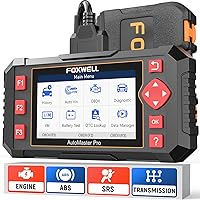
The Foxwell NT604 Elite fits owners who need to inspect engine, ABS, SRS, and transmission systems with a dedicated handheld scanner. It can clear corresponding fault codes after repairs, but it doesn't support maintenance resets or relearns, and crash data can't be cleared.
Skip it if you need service functions such as oil reset, battery registration, or ABS bleeding.
The Innova SD35 suits buyers who want a tablet-style tool with broader system diagnostics, live data, and service functions that include oil reset. It also offers battery and alternator checks.
Coverage varies, so use Innova's compatibility checker before relying on a specific feature. Skip it if you only need a simple engine-code reader.
What should you check before buying a scanner?
Confirm compatibility and the exact functions available for your make, model, and year. A scanner's feature list doesn't mean every function works on every supported vehicle.
Decide whether you need only engine codes or also want ABS, SRS, transmission, or TPMS diagnostics. Check whether you prefer a phone app or a handheld display, and whether you need live data, battery checks, or service functions.
For more help matching a tool to your needs, read our car diagnostic tool buying guide. If you want to compare options for home use, see car diagnostic tools for home use.
What happens after you clear the check engine light?
The light may stay off if the fault is repaired, but it can return if the problem remains. The vehicle runs diagnostic checks as you drive and may switch the light back on when it detects the fault again.
Clearing codes resets emissions readiness monitors. Those monitors need a complete drive cycle to repopulate, and the required driving conditions vary by vehicle.
Check readiness before an emissions test instead of clearing codes just before the appointment.
Why won't the check engine light clear?
A scanner may fail to clear a code if it can't connect, the wrong menu is open, or the fault is still active. Check the connection and tool instructions, then read the codes again instead of repeating the clear command blindly.
Confirm the ignition position and push the connector firmly into the port. If communication still fails, this guide to OBD2 scanner connection problems covers common fixes.
If the code clears but returns, the vehicle may still detect the underlying problem. A code can point to a circuit or system without proving which part failed, so avoid replacing parts based on the code alone.
Is it safe to drive after clearing the light?
Clearing a code doesn't tell you whether the car is safe to drive. Pay attention to how the vehicle runs and follow the owner's manual if the light flashes or the engine behaves unusually.
A steady light may call for prompt diagnosis, while a flashing light can signal a more urgent problem. Read whether you can drive with the check engine light on for signs that should affect your next step.
If the vehicle runs roughly, loses power, overheats, or shows other serious symptoms, stop somewhere safe and get help. A cleared light doesn't prove the issue is resolved.
How do you avoid mistakes when clearing a check engine light?
Save the code, repair the cause, and clear it once rather than erasing it repeatedly. This keeps useful clues available and gives you a clear way to check whether the fault returns.
Common mistakes include clearing codes before recording them, assuming a code names the failed part, and clearing codes just before an emissions inspection. Another is buying a scanner based on a system name alone without confirming that the function works on your exact vehicle.
For a plain explanation of warning-light causes, see what the check engine light means. If you need help interpreting the code, follow our guide to reading OBD2 codes.
How to clear the check engine light: make the right choice
Clear the code only after you save it and address the fault. If the light returns, investigate the cause instead of erasing it again.
Choose BlueDriver for wireless phone-based scanning and enhanced diagnostics on supported vehicles. Pick the Innova 5210 for engine codes, live data, and battery checks.
Choose the Foxwell NT604 Elite for engine, ABS, SRS, and transmission diagnostics; choose the Innova SD35 for a tablet display and broader system coverage. Check the exact vehicle coverage before you buy.
Frequently asked questions
Can I clear a check engine light without fixing the problem?
A scanner may erase the stored code and switch off the light temporarily, but the underlying fault remains. The light can return when the vehicle detects the problem again, and clearing codes resets emissions readiness monitors.
Save the code, diagnose the cause, and repair it before clearing.
Will clearing a check engine light reset readiness monitors?
Yes. Clearing codes can reset emissions readiness monitors, just as disconnecting the battery can.
The monitors need a complete drive cycle to run again, and the time and conditions vary by vehicle.
Check readiness before an emissions inspection.
Avoid clearing codes right before the appointment.
Should I clear a flashing check engine light?
A flashing check engine light can signal a problem that needs prompt attention. Don't use a scanner to hide it or assume the vehicle is fine; reduce load and follow your owner's manual for what to do next.
Have the vehicle checked if the light keeps flashing.
Why does the check engine light come back after clearing it?
The light often returns because the fault is still present or the vehicle detects it again during a drive cycle. Read the returning code and compare it with the original saved code.
If the code changes or the cause isn't clear, get help diagnosing the vehicle before replacing parts.