BMW Battery Registration Tool: Do You Need One?
A BMW battery registration tool records that a replacement battery is installed. Choose one that supports your BMW and battery, and check whether you need registration alone or a capacity change.
On this page (7 sections)
- What does a BMW battery registration tool do?
- When do you need to register a BMW battery?
- How should you choose a BMW battery registration tool?
- Which BMW battery registration tools fit different buyers?
- How do you set up and use a registration scanner?
- What common mistakes should you avoid?
- Do you need a BMW battery registration tool?
A BMW battery registration tool records that a replacement battery is installed. If your BMW requires registration after a battery change, an ordinary engine-code reader may not have the needed service function.
Registration and battery coding are separate. Registration tells the car a new battery is present; coding changes stored battery type or capacity settings.
What does a BMW battery registration tool do?
A BMW battery registration tool runs a service function to record a replacement battery. It does not necessarily change the car’s stored battery type or capacity.
Battery registration is different from reading fault codes. A general OBD2 scanner may read engine codes but lack BMW-specific services, so check that battery registration is named as a supported function.
If you’re new to scanning, our guide to how to read OBD2 codes explains what codes can and can’t tell you. Registration is a separate maintenance function.
Does a BMW battery registration tool code the battery?
Not always. Registration records that a new battery has been fitted, while coding changes stored battery type or capacity settings.
The ANCEL BM700 PRO supports registration but cannot change battery capacity. The Foxwell NT510 Elite supports registration that matches the original battery type and capacity, but not a different specification.
When do you need to register a BMW battery?
You may need registration when your BMW’s battery management system requires it after replacement. The exact requirement depends on your model and the battery change.
Check your owner’s manual or ask a qualified BMW service professional for guidance on your car and model year. Don’t assume that every BMW needs the same procedure.
A scanner described as BMW-compatible does not necessarily support every service on every BMW. Confirm the registration function for your exact vehicle before buying.
If you’re also comparing phone adapters, see what a BimmerCode adapter is. Coding with an app and registering a battery are different jobs, even when both use the diagnostic port.
How should you choose a BMW battery registration tool?
Start with your BMW’s model and year, then match the tool to the battery service you need. Decide whether registration alone is enough or whether the car needs its stored battery type or capacity changed.
Have the vehicle details and replacement battery type and capacity ready when you check compatibility. If the function or model coverage is unclear, contact the manufacturer before you buy.
Consider how you’ll use the scanner beyond registration. A wired handheld scanner suits someone who wants a dedicated screen and other diagnostic or maintenance functions.
A Bluetooth adapter suits someone who wants phone-based coding, but only when the app supports the task.
Don’t choose by the number of functions alone. A scanner with full-system diagnostics or many service resets still may not support the exact function on your BMW.
Is registration enough for a different battery capacity?
No, when the car needs its stored settings changed to match the new capacity. Registration alone does not change the battery capacity setting.
The BM700 PRO cannot change capacity. The NT510 Elite supports registration that matches the original type and capacity, but does not support changing to a different battery specification.
If your replacement differs, confirm the correct coding procedure with a BMW specialist and choose a tool that explicitly supports it.
Which BMW battery registration tools fit different buyers?
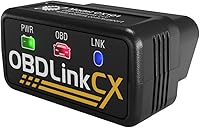
The Foxwell NT510 Elite and ANCEL BM700 PRO are the relevant options here for registration on compatible vehicles. The OBDLink CX fits a different need: phone-based BimmerCode use and OBD2 diagnostics, with no stated battery registration function.
OBDLink CX BimmerCode Adapter
The OBDLink CX is a Bluetooth adapter for compatible BMWs and the BimmerCode app, which is sold separately. Its stated features include coding and OBD2 diagnostics, but not battery registration.
Choose it if your goal is compatible phone-based coding or OBD2 diagnostics. Skip it if you need a tool specifically for registering a replacement battery, unless you confirm that your chosen app provides the service for your vehicle.
Foxwell NT510 Elite for BMW
The Foxwell NT510 Elite suits BMW, Mini, and Rolls-Royce owners who want battery registration alongside full-system diagnostics and service functions. It also offers bidirectional active tests, which can command supported vehicle components during diagnosis.
Its registration supports matching the original battery type and capacity, not changing to a different specification. Skip it if you need that capacity change, or if compatibility for your model and year is not confirmed.
ANCEL BM700 PRO for BMW
The wired BM700 PRO suits a DIY owner or small shop looking for a dedicated BMW-focused scanner with battery registration and other maintenance functions. It has a built-in screen and uses a cable at the vehicle’s 16-pin OBD2 port.
It registers batteries with the same type and capacity but cannot change capacity. Skip it if you need to code a different specification, and confirm the services available for your exact BMW before buying.
For more options, compare BMW and Mercedes diagnostic tools. If you’re considering a phone adapter, our BimmerCode adapter guide explains that separate use case.
How do you set up and use a registration scanner?
Follow the scanner’s instructions for your vehicle, and confirm compatibility before starting the service. The basic setup depends on the tool: a handheld unit connects by cable, while a phone adapter pairs with a compatible app.
For the BM700 PRO, connect it to the 16-pin OBD2 port and follow the on-screen prompts. It uses a wired connection and does not need a network or external power source.
For the NT510 Elite, connect it to Wi-Fi and update its software on first start, as Foxwell recommends.
Before using either tool, make sure you have selected the correct vehicle and the battery matches the registration function supported by that tool. Keep the vehicle stable and follow the prompts in order; don’t interrupt a service function partway through.
A scanner’s ability to connect does not prove that it supports battery registration on your model. If the function is missing or the prompts don’t match your situation, stop and check the manual or contact a BMW specialist.
What common mistakes should you avoid?
The most common error is treating registration and coding as interchangeable. A tool that registers a replacement may not let you change the car’s stored capacity or battery type.
Other mistakes include buying based on a broad “BMW compatible” label, assuming a phone coding adapter includes maintenance services, and skipping a required software update. Check model-year support, battery requirements, app compatibility, and any first-use setup before relying on the scanner.
If a scanner won’t connect, use our guide to OBD2 scanner connection problems. Connection trouble and missing vehicle support are different issues, and the right fix depends on which one you have.
Do you need a BMW battery registration tool?
Choose the Foxwell NT510 Elite or ANCEL BM700 PRO if you need registration for a compatible BMW and the replacement matches the supported battery specification. The NT510 Elite adds bidirectional active tests, while the BM700 PRO offers a wired handheld setup with other BMW service functions.
Choose the OBDLink CX for compatible BimmerCode use and phone-based OBD2 diagnostics, not for battery registration based on its stated functions. If you need a different battery capacity coded, confirm the procedure and tool support with a BMW specialist before buying.
Frequently asked questions
Do BMW batteries need to be registered after replacement?
Some BMWs require battery registration after replacement so the battery management system knows a new battery is installed. The requirement depends on your model and the work being done.
Check your owner’s manual or ask a BMW specialist about the procedure for your car before starting.
Can a BMW battery registration tool change battery capacity?
Not every tool can change the battery capacity or Ah rating. The ANCEL BM700 PRO registers a battery but cannot change its capacity.
The Foxwell NT510 Elite supports registration that matches the original battery type and capacity, not a different specification.
Confirm the tool supports your BMW and intended battery.
Is a BimmerCode adapter a battery registration tool?
A BimmerCode adapter is used with the BimmerCode app for coding compatible BMWs. The OBDLink CX works with BimmerCode, but its stated features focus on coding and OBD2 diagnostics, not battery registration.
Check app and vehicle compatibility before choosing an adapter.
Can a regular OBD2 scanner register a BMW battery?
A basic OBD2 scanner may read engine codes without offering BMW battery registration. Look for an explicit battery registration function and confirm support for your model year.
BMW-focused scanners can include this service, but functions still vary by vehicle.