Car Diagnostic Tools: A Plain Buying Guide
A car diagnostic tool reads trouble codes and, depending on the model, can show live data or support maintenance tasks. Choose a basic reader for engine warnings, a phone scanner for app-based checks, or a more advanced tool for supported system diagnostics and service functions.
On this page (7 sections)
- What does a car diagnostic tool tell you?
- Which type of car diagnostic tool suits your needs?
- What should you compare before buying a car diagnostic tool?
- How do you set up and use a car diagnostic tool?
- What mistakes should you avoid with a diagnostic tool?
- Can a car diagnostic tool clear a warning light?
- Which car diagnostic tool should you choose?
A car diagnostic tool reads trouble codes and, depending on the model, can show live data or support maintenance tasks. A basic OBD2 reader can help you understand an engine warning, while an advanced scanner may access several vehicle systems.
The right tool depends on your vehicle, your reason for scanning and how much diagnostic detail you need. Check compatibility for both your vehicle and the specific functions you expect to use before choosing a model.
What does a car diagnostic tool tell you?
A car diagnostic tool retrieves information from a vehicle's electronic control systems. A basic OBD2 reader can retrieve standard engine and emissions-related trouble codes, while some models also show live readings and readiness status.
More capable scanners may read codes from systems such as ABS, airbags and transmission. Some also show freeze-frame information captured around a fault or provide service functions for supported maintenance tasks.
A trouble code is a clue about a detected condition, not an automatic verdict on which part has failed. Use it with symptoms, saved data and further checks before deciding on a repair.
Start with how to read OBD2 codes if you have a code already. It explains what the code communicates and why more diagnosis may be needed.
Which type of car diagnostic tool suits your needs?
Choose a tool by the information you want and the way you prefer to view it. The main choices are a basic handheld reader, a phone adapter, or a more advanced handheld or tablet scanner.
| Tool type | A good fit when you want | Check before buying |
|---|---|---|
| Basic handheld reader | Standard engine and emissions codes | Vehicle support and whether it reads the systems you need |
| Phone adapter | Wireless scans and an app on your phone | Phone operating system, app requirements and supported systems |
| Enhanced handheld scanner | More system codes or live data on a built-in screen | Coverage for each system and vehicle |
| Tablet-style scanner | Broad diagnostics, active tests or service functions | Exact vehicle support, function limits and update terms |
A simple reader is sensible if you mainly want to look up an engine warning and keep the tool in the car. A more complex scanner makes sense only when you have a recurring need for the extra coverage or service tasks it supports.
Is a handheld car diagnostic tool enough?
A basic handheld reader is enough for many drivers who want to retrieve standard engine codes without using a phone. It can also be a practical choice if you value a dedicated screen and simple plug-in operation.
The Innova 5210 reads and clears engine codes, displays live data and includes battery and alternator checks. It also has an oil reset feature, while ABS coverage varies by vehicle.
Choose this type if you expect occasional checks and want a compact tool with several useful basics. Skip it if your main need is verified access to many vehicle systems or specialized service procedures.
A reader can display a code without identifying the part to replace. Before clearing anything, record the code and relevant readings, then investigate the symptoms and likely causes.
When does a phone-based car diagnostic tool make sense?
A phone-based scanner suits you if you want to see scan results, live data and repair information in an app. It uses your vehicle's OBD2 port and connects wirelessly to a compatible phone or tablet.
BlueDriver supports enhanced diagnostics for systems such as ABS, SRS, TPMS and transmission on supported vehicles. Its app also provides live data, freeze frames, readiness checks and repair reports.
Pick BlueDriver if you prefer an app and want more than basic engine codes, while confirming the exact vehicle coverage first. Skip a phone adapter if you want a built-in screen, do not want to rely on a mobile device, or need functions outside its supported coverage.
A wireless connection adds a few setup steps. Install the required app, allow the phone to connect as instructed, and keep the phone nearby during a scan.
If connection fails, check that the ignition is in the required position, the scanner is fully seated, and the phone has the necessary app permissions. Our OBD2 scanner connection guide covers other common causes.
When should you buy an advanced car diagnostic tool?
An advanced scanner is worth considering when standard engine codes are not enough. It may provide access to more systems, detailed live data, active tests or supported service functions.
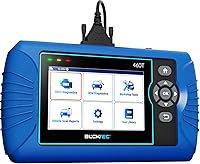
The BLCKTEC 460T supports all-system diagnostics, live data and 12 or more service functions, depending on vehicle support. It works with the RepairSolutions2 app in the United States and Canada and includes free lifetime updates.
This is a fit for a home mechanic who expects to use system diagnostics or maintenance functions more than once in a while. Skip it if you only need occasional engine-code lookups or live outside its supported region.
The TOPDON AD600S provides diagnostics for engine, ABS, transmission and SRS, with 9 service functions. Wi-Fi is required for initial setup, and function coverage varies by vehicle.
Choose it if those systems and service tasks match your own vehicle work. Skip it if you need a function that is not confirmed for your exact year, make and model, or if Wi-Fi setup is impractical.
For a tablet-style tool, the Autel MaxiCOM MK808S offers full-system diagnostics, live data, active tests and a broad service menu. Check the supported functions for your vehicle before relying on it for a particular job.
The MK808S suits a home garage or shop that can make use of broader diagnostic access and active tests. Skip it if your needs stop at standard engine codes, since its wider tool set would add complexity without helping your routine task.
What should you compare before buying a car diagnostic tool?
Compare vehicle compatibility, system coverage, data features, connection style and the work you plan to do. A long feature list matters only when the functions are supported on your vehicle and useful to you.
Does the car diagnostic tool support your vehicle?
Check the vehicle's year, make, model and market against the manufacturer's compatibility information. Then confirm the exact system and function you need, because engine, ABS, SRS and transmission coverage may differ on the same vehicle.
This check matters especially for service functions. A scanner may name a reset or calibration without supporting it for every vehicle in its broad compatibility range.
If you need a particular procedure, confirm it before buying and keep the vehicle identification details handy. Do not assume that two scanners with similar feature lists provide the same access.
Do you need live data or freeze-frame data?
Live data shows selected sensor or system readings while the vehicle is running or operating. It can help you compare readings with symptoms, but useful interpretation depends on knowing what values are expected for that vehicle and condition.
Freeze-frame data records conditions around some faults. It may preserve useful context such as readings at the time a fault was stored, so review it before clearing codes.
Read what freeze-frame data means on a scan tool if you are deciding whether you need that feature. A basic code reader may be enough if your only aim is to retrieve a standard engine code.
Are service functions worth paying for?
Service functions are useful when they match maintenance jobs you actually plan to perform. Examples among these scanners include oil reset, battery management, steering angle reset, ABS bleeding, DPF regeneration and TPMS procedures, but availability depends on the vehicle.
A named feature does not mean the scanner handles every vehicle or every version of that task. Confirm the exact make, model, year and function, and make sure you understand the repair procedure before using a service menu.
For occasional maintenance, an oil reset may be sufficient. If you maintain several systems or work on more than one compatible vehicle, broader service coverage could be more useful.
Should you choose a built-in screen or a phone app?
A built-in screen keeps the scan interface on the tool and avoids relying on a phone during diagnosis. It can suit drivers who want a dedicated device they can store with the vehicle.
A phone adapter uses your phone or tablet as the display and may offer app-based reports or repair information. Check operating system compatibility, pairing steps and whether you will have a reliable connection where you plan to scan.
Do update and subscription terms matter?
Update terms affect how you maintain a scanner and whether you may face recurring software costs. The Innova 5210 and BlueDriver provide their app features without subscriptions, while the BLCKTEC 460T and TOPDON AD600S specify free lifetime updates.
TOPDON AD600S has an initial Wi-Fi setup requirement. The Autel MK808S product information describes an annual upgrade fee, so clarify the current terms and the features available without renewal before making it your long-term shop tool.
How do you set up and use a car diagnostic tool?
Set up a scanner with the vehicle parked safely, the correct app or tool ready, and the ignition in the position the scanner requires. A careful first scan helps prevent connection errors and preserves information you may need later.
- Locate the OBD2 port using the vehicle manual or our guide to finding the OBD2 port.
- Make sure the vehicle is stationary and follow the scanner's setup instructions.
- For a wired scanner, align the connector and press it firmly into the port.
- For an app-based scanner, install the correct app and complete its pairing steps.
- Turn the ignition to the position needed for the scan. Some tools recommend the ON position with the engine off for a reliable code read.
- Read and save the codes and any useful live or freeze-frame data before clearing anything.
- Compare the results with the symptoms and confirm the next diagnostic step.
If the scanner does not connect, check the ignition position, connector seating, app permissions and compatibility. Do not force the plug, and do not clear codes simply to make a warning disappear.
After a code clear or battery disconnect, emissions readiness monitors may reset and require a complete drive cycle to return. Plan for that before an inspection rather than assuming the scanner has failed.
What mistakes should you avoid with a diagnostic tool?
The most common mistake is treating a code as proof that one specific part has failed. A code describes a system condition that needs context, and replacing a part without checking symptoms or related data can lead to an unnecessary repair.
Another mistake is buying by feature count alone. Confirm each needed function against your exact vehicle, particularly for ABS, airbag, transmission and maintenance procedures.
Avoid clearing a code before saving it and reviewing freeze-frame data. Clearing can remove useful diagnostic context and reset readiness monitors, while the underlying fault may bring the warning back.
Do not start a service function unless you understand its purpose and have confirmed support for your vehicle. Some procedures affect vehicle systems directly, so follow repair information and stop if the tool's prompts or results do not match the job.
Can a car diagnostic tool clear a warning light?
Many scanners can clear supported codes, but clearing a warning does not repair the cause. If the underlying issue remains, the light may return.
A code clear can also reset emissions readiness monitors. Save the codes and relevant data first, resolve the fault, and then recheck the vehicle.
See how to clear a check engine light with a scanner for a careful sequence. If the warning is new or you are unsure whether driving is safe, read what the check engine light means and follow the guidance for your vehicle.
Which car diagnostic tool should you choose?
Pick a tool based on the job you expect to do most often. The Innova 5210 fits occasional handheld checks and battery readings, while BlueDriver suits drivers who want wireless, app-based scans and enhanced diagnostics.
Choose the BLCKTEC 460T or TOPDON AD600S if their system access and service functions match work you plan to perform. Consider the Autel MaxiCOM MK808S when a tablet interface, full-system access and active tests are useful in a home garage or shop.
Before buying, confirm vehicle support and the exact features you need. If your goal is only to understand an engine warning, a basic reader can be enough; compare car diagnostic test costs if you are weighing a home scan against a repair shop visit.
Frequently asked questions
What does a car diagnostic tool do?
A car diagnostic tool communicates with a vehicle's control systems to retrieve trouble codes. On some models, it can also show live data or service information.
A basic OBD2 reader focuses on emissions-related engine codes, while advanced scanners may cover systems such as ABS, airbags or transmission.
Check exact vehicle and feature coverage before you buy.
Will an OBD2 scanner work with every car?
No. OBD2 coverage depends on the vehicle's year, market, powertrain and the tool's compatibility.
Many gas vehicles sold in the United States from 1996 onward support standard OBD2 diagnostics.
Enhanced functions vary by make and model, so confirm your exact vehicle and the functions you need with the tool maker's compatibility information.
Can a scanner tell me exactly what part to replace?
A trouble code points to a detected condition, but it does not always identify a failed part by itself. Use the code with symptoms, freeze-frame details and appropriate diagnostic checks before deciding on a repair.
If you are unsure how to verify the cause, ask a qualified repair professional.
Can I clear a check engine code with a diagnostic tool?
Many OBD2 tools can clear engine codes, but clearing a code does not fix the cause. It can also reset emissions readiness monitors, which may need a complete drive cycle to return.
Read the code and save relevant data before clearing it.
Then address the fault and recheck the vehicle.
Do I need a professional scan tool at home?
Most drivers who only want to check an engine warning can start with a basic reader or phone adapter. A more advanced scanner may make sense if you need access to additional systems, live data or supported service functions.
Match the tool to your vehicle and tasks rather than buying features you will not use.