8 Best Car Diagnostic Tools for Home Use (October 2026)
The best car diagnostic tools for home use include the Innova 5210 Code Reader for routine engine checks, the BLCKTEC 460T Code Reader for multi-system scanning, and the Foxwell NT604 Elite Scanner for ABS and SRS codes.
On this page (6 sections)
The Innova 5210 is the best car diagnostic tool for home use for routine engine checks, with live data and battery testing. For ABS, SRS or transmission coverage, consider a broader handheld scanner and check that its functions match your vehicle.
A home scanner can help you read a warning code, check live engine data or confirm readiness before an emissions test. The best choice depends on whether you need basic engine information, access to other vehicle systems, or functions that support a specific maintenance job.
Start with our plain car diagnostic tool buying guide if you are deciding between a handheld scanner and a phone adapter. You can also learn how to read OBD2 codes and what freeze frame data shows before choosing a tool.
Our picks at a glance
-
1

-
2
-
3

- 4
 Best for routine service jobsCheck it
 - 5
 Check it
GEARWRENCH GWSMARTBT Bidirectional Scanner
Best for phone-based active tests - 6
 Check it
Foxwell NT630 Plus ABS Scanner
Best for supported brake bleeding - 7
 Check it
THINKCAR ThinkScan 662 Scanner
Best for bidirectional DIY checks - 8
 Best for frequent service resetsCheck it
How do the best car diagnostic tools for home use compare?
The best home scanner is the one that covers the systems and jobs you expect to handle. A basic engine reader can be a better fit than a broader scanner if you only need occasional code checks and live engine data.
We compared the products by their stated system access, live data, service functions and update arrangements. A longer feature list only helps when your car supports those functions and you know when it makes sense to use them.
| Product | Best for | Main use | Display | Extra | Our score |
|---|---|---|---|---|---|
| Innova 5210 Code Reader | routine engine checks | Engine codes, live data and battery tests | 2.8 in | Oil reset; ABS coverage varies | 8.7 |
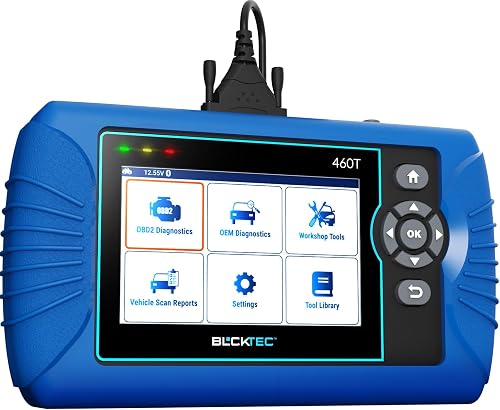
| BLCKTEC 460T Code Reader | multi-system scanning | All-system diagnostics and service functions | 4.3 in | 8.6 | |
| Foxwell NT604 Elite Scanner | ABS and SRS codes | Diagnostics for 4 systems | 4.3 in | 8.5 | |
| TOPDON AD600S Scanner | routine service jobs | Four-system diagnostics and service functions | 5 in touchscreen | 8.4 | |
| GEARWRENCH GWSMARTBT Bidirectional Scanner | phone-based active tests | Active tests and service functions | 8.2 | ||
| Foxwell NT630 Plus ABS Scanner | supported brake bleeding | ABS and SRS diagnostics | 2.8 in | 8.0 | |
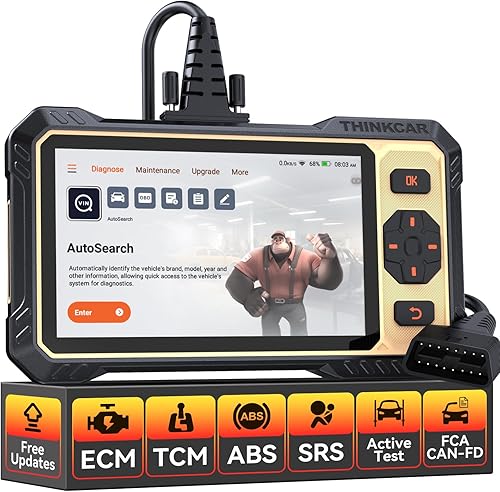
| THINKCAR ThinkScan 662 Scanner | bidirectional DIY checks | Multi-system diagnostics and active tests | 6.2 in touchscreen | 7.5 | |
| XTOOL D5S Scanner | frequent service resets | Four-system diagnostics and 16 resets | 5.45 in touchscreen | 7.4 |
Best car diagnostic tools for home use
These picks range from straightforward engine and battery checks to multi-system diagnostics and active tests. For every scanner, confirm support for your year, make and model before relying on ABS, SRS, transmission or service features.
Innova 5210 Code Reader: Best for routine engine checks
- Reads and clears engine codes
- Live engine data
- Battery and alternator tests
- ABS coverage varies
A practical fit for regular engine checks, live data and battery testing. Check Innova's coverage tool for your vehicle and any ABS or oil reset function you need.
Pros
- Battery and alternator tests
- Live data and readiness checks
- RepairSolutions2 app has no subscription
Cons
- ABS coverage varies
- Vehicle compatibility and features need checking
The Innova 5210 is a sensible choice for routine engine checks, live data and battery testing in one handheld tool. Its live data can show readings such as RPM, engine temperature, fuel trims and oxygen sensor information.
The battery test checks alternator health, while the readiness feature helps you check whether emissions monitors are set. An oil reset function is included, but support for ABS and other features can vary by vehicle.
Use Innova's coverage checker for your car before buying, especially if you need ABS access or an oil reset. The RepairSolutions2 app is available for iPhone and Android without a subscription.
Read our Innova 5210 review for a closer look at its features. This scanner is less suitable if your main need is transmission diagnostics, frequent service resets or active tests.
BLCKTEC 460T Code Reader: Best for multi-system scanning
- Engine, transmission, ABS and SRS codes
- Live and freeze frame data
- 12+ reset functions
- Vehicle functions vary
This handheld scanner covers more systems and service work than a basic engine reader. Verify the exact functions for your vehicle before choosing it.
Pros
- Reads several vehicle systems
- Live and freeze frame data
- Free lifetime updates
Cons
- Functions vary by vehicle
- The app and tool are limited to the US and Canada
The BLCKTEC 460T suits home mechanics who want to scan several vehicle systems and review more than a basic engine code. It covers engine, transmission, ABS and SRS diagnostics, with live data and freeze frame information.
You can graph, record and replay live data, including up to four streams in one graph. AutoVIN and automatic scanning are designed to identify the vehicle and scan its control units after connection.
The scanner also offers more than 12 reset functions and free lifetime updates. Skip it if you need to use the tool or its RepairSolutions2 app outside the US and Canada, or if the exact service functions you need are not supported for your vehicle.
Foxwell NT604 Elite Scanner: Best for ABS and SRS codes
- Engine, ABS, SRS and transmission diagnostics
- Live data
- Built-in DTC library
- No service resets
A focused choice for owners who want to scan engine, ABS, SRS and transmission systems. It does not provide maintenance resets or relearns.
Pros
- Four system areas
- Live data and data playback
- Protective case included
Cons
- No oil reset or other service functions
- Vehicle coverage varies
The Foxwell NT604 Elite is a good match when you want diagnostics for engine, ABS, SRS and transmission systems without paying for service reset features you will not use. It provides live data, a built-in DTC library, playback and printing.
It does not support maintenance functions such as oil reset, battery registration, ABS bleeding or throttle relearn. For SRS, it can read and clear common codes that are not caused by a crash, but it cannot clear crash or collision data.
Choose this scanner for system checks and code information. Skip it if you specifically need service resets or relearns, and check Foxwell's compatibility information for your vehicle before buying.
TOPDON AD600S Scanner: Best for routine service jobs
- Engine, ABS, SRS and transmission diagnostics
- 9 service functions
- 5 in touchscreen
- Free lifetime Wi-Fi updates
The AD600S combines four-system diagnostics with nine everyday service functions. Check vehicle coverage for the specific job, since functions vary by vehicle.
Pros
- Nine service functions
- Live data and code lookup
- Free lifetime software updates
Cons
- Vehicle coverage varies
- Needs Wi-Fi for initial setup
The TOPDON AD600S fits owners who want multi-system diagnostics and a set of common maintenance functions in one scanner. Its nine functions include oil reset, brake or EPB reset, battery management reset, steering angle reset, DPF regeneration, TPMS reset, throttle relearn, ABS bleeding and injector coding.
Its touchscreen can present live data as text or a four-in-one waveform graph. Free lifetime software updates are available over Wi-Fi, and most basic diagnostics can work offline after the initial setup.
Wi-Fi is needed during setup, and each special function depends on the vehicle. Choose another tool if your car does not support the service job you want to perform.
GEARWRENCH GWSMARTBT Bidirectional Scanner: Best for phone-based active tests
- Bidirectional control
- Live actuation tests
- 23 reset and relearn functions
- Live data mapping
This tool suits a home mechanic who wants bidirectional control and active tests through a smart device. Confirm its vehicle coverage and app requirements before buying.
Pros
- Full bidirectional control
- 23 reset and relearn functions
- Live data mapping and freeze frame capture
Cons
- Requires a smart device
- Vehicle and app details need confirmation
The GEARWRENCH GWSMARTBT is aimed at home mechanics who want bidirectional control and live actuation tests using a smart device. It also supports 23 reset and relearn functions, live data mapping and freeze frame capture.
This format can suit you if you already prefer viewing diagnostic information on your phone or tablet. Skip it if you want a standalone handheld screen, and confirm the app requirements and vehicle coverage for the functions you plan to use.
Foxwell NT630 Plus ABS Scanner: Best for supported brake bleeding
- ABS and SRS diagnostics
- Supported ABS auto bleed and active tests
- Engine OBD2 functions
- Coverage varies by vehicle
Choose this focused scanner when ABS diagnostics and supported brake bleeding functions matter most. Confirm your vehicle's exact support before relying on a specific test or service function.
Pros
- ABS active tests on supported vehicles
- No phone app required
- Free Wi-Fi updates
Cons
- Not a full-system scanner
- No transmission diagnostics
The Foxwell NT630 Plus focuses on ABS and SRS diagnostics, standard OBD2 engine functions and selected maintenance work. Supported features include ABS active tests and auto bleed, along with live data and freeze frame information.
It is a focused option for brake work when the specific vehicle supports the function. It does not scan transmission modules or provide full-system access, and ABS auto bleed support depends on the vehicle's year, model and brake system configuration.
Check compatibility before buying or beginning a brake job. Skip this scanner if you need broad system coverage or a battery test.
THINKCAR ThinkScan 662 Scanner: Best for bidirectional DIY checks
- Bidirectional active tests
- Engine, ABS, SRS and transmission diagnostics
- 12 reset functions
- CAN FD and FCA gateway access
A broad scanner for DIY users who want active tests, four-system diagnostics and service functions. Some newer FCA functions require a separately paid AutoAuth account.
Pros
- Bidirectional active tests
- 12 reset functions
- Free lifetime updates
Cons
- Compatibility varies by vehicle
- FCA AutoAuth account is separate
The THINKCAR ThinkScan 662 suits DIY users who want active tests as well as engine, ABS, SRS and transmission diagnostics. It also offers 12 reset functions and can show live data as text or a four-in-one waveform chart.
Its CAN FD and FCA gateway access can help with compatible vehicles, but FCA AutoAuth is a separate account that may require a separate payment. Compatibility for each system and function still depends on the vehicle.
Choose it if active tests are a regular part of your diagnostic work and you can verify the needed support. Skip it if you only want to read occasional engine codes.
XTOOL D5S Scanner: Best for frequent service resets
- Engine, ABS, SRS and transmission diagnostics
- 16 reset functions
- Live data graphs
- CAN FD and FCA AutoAuth
The D5S offers a wide set of service functions alongside diagnostics for four system areas. Check compatibility for your vehicle and remember that FCA AutoAuth access may require a separate account.
Pros
- 16 reset functions
- Live data in text or graphs
- Free lifetime updates
Cons
- Vehicle coverage varies
- FCA AutoAuth account may be needed
The XTOOL D5S fits home mechanics who expect to use service functions alongside engine, ABS, SRS and transmission diagnostics. It offers 16 resets, with functions such as EPB, steering angle, battery management, throttle body relearn, TPMS, ABS bleeding and injector coding.
Live data can appear as text or graphs, and the scanner includes a built-in code library. It supports CAN FD and FCA AutoAuth, though access for FCA vehicles that require AutoAuth may involve a separate account.
Choose the D5S if the particular resets you need are supported for your vehicle. Skip it if a basic engine reader meets your needs or if you have not confirmed compatibility for the intended job.
How do you choose a car diagnostic tool for home use?
Start with the warning light or maintenance task you want to handle, then check whether the scanner supports that system and function on your exact vehicle. This avoids paying for features that will not work with your car.
Will a home car diagnostic tool scan your car's system?
An OBD2 reader can cover basic engine and emissions-related diagnostics, but access to ABS, SRS and transmission systems varies. A scanner may connect to the port and read engine codes while lacking access to another control module.
Before buying, check the tool's compatibility guidance for your vehicle's year, make and model. If it identifies a feature by name, confirm that exact feature rather than assuming a general label such as “all-system” includes every function for your car.
You can find your connector with our guide to where the OBD2 port is located. A compatible connector is only the starting point; it does not prove that every system or service feature is supported.
Should you pay for service functions or active tests?
Pay for service functions when you have a specific maintenance job in mind and the scanner supports that job on your car. Examples in this group include oil resets, electronic parking brake service, battery resets and ABS bleeding.
Active tests serve a different purpose: they let a compatible scanner send commands to selected components so you can check their operation. That capability is useful for more involved diagnosis, but it takes more knowledge than reading a code and should be used only when you understand the test and its procedure.
A function count does not tell you whether a scanner supports the task on your vehicle. Confirm the year, make, model and, when requested, VIN or engine details before paying for a feature.
Is a handheld screen or phone-based tool a better fit?
A handheld scanner puts the display and controls together, which is convenient when you want to work near the car without relying on a separate screen. The GEARWRENCH option uses a smart device, so it suits buyers who prefer viewing information on a phone or tablet.
Consider where you will read the display, whether you want a larger screen for graphs and whether a cable reaching from the port to your working position is practical. Live data is easier to interpret when you can focus on a few relevant readings instead of watching every available value.
Do live data and freeze frame help with a warning light?
Live data shows changing information from supported vehicle sensors, while freeze frame records conditions associated with a fault. These features can help you understand when a problem occurred and what readings deserve a closer look.
For example, a reader might compare engine readings while a fault is present, then use the stored freeze frame as context. See our guide to what freeze frame data shows for more on reading that snapshot.
What should you do before the first scan?
Find the OBD2 port, read the scanner's start-up directions and identify the vehicle before you connect. A careful first scan helps you save useful information before you consider clearing a code.
Park safely, set the parking brake and switch the ignition to the position required by the scanner. The Innova 5210 instructions recommend turning the ignition on with the engine off, then pressing the connector firmly into the port until it clicks.
Follow the instructions for your specific scanner because menus and connection steps differ. Some tools can retrieve a VIN automatically, while others may require you to select the vehicle or enter its details.
Run a scan and save or record the codes and available data before clearing anything. Note which warning lights are on and whether the issue appeared during a particular drive or condition.
What mistakes should home users avoid?
The most common mistakes are buying based on a broad feature label, clearing codes before recording them and expecting a scanner to repair the fault. A scanner provides diagnostic information; the repair still depends on identifying and addressing the cause.
Clearing codes can reset readiness monitors. If you have an emissions inspection coming up, check readiness first and allow a complete drive cycle for monitors to repopulate after a battery disconnect or code clear.
Do not assume a warning light is fixed because it went away after clearing a code. If the underlying problem remains, the code or warning may return; use the scan results to guide diagnosis and repair.
Avoid running a reset, relearn or active test simply because the menu offers it. Check the service procedure and confirm compatibility first, especially before using a function that affects brakes, steering, batteries or other vehicle systems.
If a scanner will not connect, check that the connector is fully seated and that the ignition is in the correct position. Our OBD2 scanner connection troubleshooting guide covers common connection problems.
Which car diagnostic tool should you choose?
Choose the Innova 5210 for routine engine checks, live data, readiness checks and battery testing. It is the clearest fit for an owner who wants a straightforward tool and does not need broad module access.
Choose the Foxwell NT604 Elite if you want engine, ABS, SRS and transmission code checks but do not need service resets. For a more specialized ABS and brake tool, consider the Foxwell NT630 Plus when your vehicle supports its needed tests or auto bleed.
Choose the BLCKTEC 460T or TOPDON AD600S for broader system diagnostics and service functions, after confirming coverage for your vehicle. The GEARWRENCH GWSMARTBT and THINKCAR ThinkScan 662 suit users who want bidirectional active tests, while the XTOOL D5S is a fit for owners who need a wider range of resets.
For the best car diagnostic tool for home use, match the scanner to your next real job: Innova for everyday engine and battery checks, a multi-system model for broader diagnostics, or a focused ABS scanner for supported brake work. Check exact vehicle compatibility before you decide, then read what the check engine light means if that is what brought you here.
Our top 3 picks at a glance
-
1
-
2
-
3
Frequently asked questions
What is the best car diagnostic tool for home use?
For basic engine checks, the Innova 5210 combines code reading, live data and battery testing. If you need ABS, SRS or transmission diagnostics, compare multi-system scanners such as the BLCKTEC 460T, Foxwell NT604 Elite or TOPDON AD600S.
Confirm compatibility for your car's year, make and model before buying.
Will an OBD2 scanner work with every car?
No. OBD2 rules cover many vehicles, but a scanner's system access and special functions vary by year, make and model.
Check support for the exact task you need, such as reading ABS codes or running a reset.
A connector that fits does not guarantee every feature will work.
Can a home scanner fix a check engine light?
A scanner reads the fault code and may clear it, but it does not repair the cause. Diagnose and repair the underlying issue first, then use a compatible scanner to clear the code if needed.
See our guide to reading OBD2 codes before deciding what to check next.
Do I need a bidirectional scanner for home use?
No. A basic code reader can be enough for checking engine codes and live data.
Bidirectional control is useful when you need a supported scanner to send commands to vehicle components for active tests.
Check which tests work for your vehicle before paying for that capability.
Can I clear codes before a smog test?
Clearing codes can reset readiness monitors, so the vehicle may need a complete drive cycle before those monitors repopulate. Check readiness status before an emissions inspection rather than clearing codes as a last-minute step.
Our guide to check engine light clearing explains what to expect.