Where Is the OBD2 Port in a Car?
The OBD2 port is usually under the dashboard on the driver’s side, near the steering column. Look for a 16-pin socket above the pedals, around the lower dash, or behind a small panel.
On this page (6 sections)
The OBD2 port is usually under the dashboard on the driver’s side, near the steering column. Look above the pedals, around the lower dash, and behind any small access cover for a 16-pin socket.
You usually don't need tools to find it. Use a flashlight, move the driver’s seat back, and look upward from the footwell without pulling off trim.
Where is the OBD2 port in most cars?
In most cars, the OBD2 port is within reach of the driver’s seat, below the steering wheel. Common spots include above the pedals, under the steering column, and along the lower edge of the dashboard.
The socket may point down, toward the seat, or toward the footwell. Its opening is typically trapezoid-shaped, with a row of connector slots inside.
Check near the center console if you don't see it by the steering column. Some cars place it behind a small removable cover or low panel; consult the owner’s manual before removing anything.
How can you recognize the OBD2 port?
The OBD2 port is a 16-pin socket, not a round power outlet or USB port. It is often uncovered, but some cars hide it behind a small cover.
Use a flashlight and compare the socket shape with the connector on your scanner. The port should be large enough for a diagnostic plug, with the pins arranged inside a broad, slightly tapered opening.
Don't force a plug into a socket that looks close but doesn't match. Check the connector orientation and the vehicle manual if you're unsure.
Where is the OBD2 port under the dashboard?
The OBD2 port under the dashboard may be tucked above the pedals or to one side of the steering column. Sit in the driver’s seat and look upward from the footwell, using a flashlight to inspect the lower dash.
Keep your hands clear of sharp edges and moving parts. Avoid reaching near wiring or removing a panel unless the manual explains how to access the connector.
What if you can’t find the OBD2 port?
If you can’t find the OBD2 port, check the owner’s manual and inspect the driver’s lower dash again. Then look around the center console, near the steering column, and behind any labeled access cover.
A port may be set back from the edge, so view the area from more than one angle. Don't pry at fixed trim or pull on wiring to make more room.
Vehicles from different years or markets can vary. For older vehicles, learn about the difference between OBD1 and OBD2 before assuming an OBD2 scanner will fit.
How do you plug in a scanner safely?
Plug the scanner into the port with the connector aligned and the vehicle set up as its instructions require. The plug should seat firmly without force.
Move the seat back if it gives you more room, and keep the scanner cable away from the pedals. If the connector won't fit, check its orientation and the scanner’s instructions rather than pushing harder.
Some readers need the ignition in the ON position to communicate. Follow the vehicle and scanner instructions for turning the ignition on and starting a scan.
Which code reader suits a hard-to-reach port?
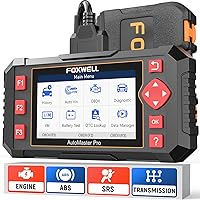
A corded code reader may be easier to position when the port sits high or faces toward the footwell. The Innova 5210 Code Reader reads engine codes and has an attached cable; ABS coverage varies by vehicle.
The Foxwell NT301 Code Reader is another corded option, with live data graphs and an I/M readiness check. Choose it if you want to view engine readings or readiness status as well as codes.
Would a wireless scanner help with port access?
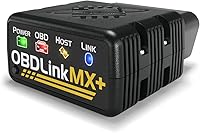
A wireless scanner can reduce the amount of cable in the footwell. The BlueDriver Bluetooth OBD2 Scanner plugs directly into the OBD2 port and connects to a phone or tablet; supported vehicle functions vary.
Keep any connected device away from pedals and steering parts. See how to read OBD2 codes from your car for what to do after connecting a scanner.
Why might a scanner fail to connect?
A scanner may fail to connect because it isn't fully seated, the ignition is in the wrong position, or the tool doesn't support the vehicle or function. Check the plug, follow the ignition steps, and confirm compatibility.
If the scanner powers on but doesn't communicate, try reconnecting it firmly. Don't force the plug or bend its pins.
For more checks, follow the steps in OBD2 scanner not connecting. If you read a trouble code, what the check engine light means can help explain what to investigate next.
Where is your car’s OBD2 port?
For most drivers, the first place to check is under the driver’s dashboard near the steering column. Search above the pedals, along the lower dash, and near the center console before checking the owner’s manual.
Choose the Innova 5210 Code Reader or Foxwell NT301 Code Reader if you prefer a corded reader. Consider the BlueDriver Bluetooth OBD2 Scanner if a direct plug with a wireless phone connection better fits your setup.
Once you find the port, follow the scanner’s connection steps and keep cables clear of the pedals. Use how to read OBD2 codes to interpret the scan results.
Frequently asked questions
Where is the OBD2 port usually located?
It is usually under the driver’s side dashboard, near the steering column. Check above the pedals, along the lower dash, or behind a small cover.
The port is a 16-pin socket, often trapezoid-shaped, and should be reachable without removing trim.
Do all cars have an OBD2 port in the same place?
No. The driver’s side lower dash is the most common area, but the port may sit near the center console, beside the steering column, or behind a small panel.
Check your owner’s manual if a careful visual search does not find it.
What does an OBD2 port look like?
An OBD2 port is a 16-pin connector, usually with a trapezoid-shaped opening. It may be open and visible under the dash or set behind a removable cover.
Do not mistake a smaller accessory socket or an empty clip for the diagnostic connector.
Can I drive with a scanner plugged into the OBD2 port?
Some scanners can remain connected while driving, but follow the scanner and vehicle instructions. Keep the cable and device clear of pedals, steering parts, and your legs.
A scanner that connects wirelessly may avoid a cable across the footwell, but check its compatibility first.