Innova 5210 OBD2 Scanner Review: Worth It? (October 2026)
The Innova 5210 suits DIYers who want engine code reading, live data and a battery test in one handheld scanner. Check vehicle coverage before you rely on its ABS or oil reset functions.
On this page (10 sections)
- What does the Innova 5210 do?
- How should you choose the Innova 5210?
- How do you set up the scanner?
- What can you learn from its live data?
- Can it help with a check engine light and smog readiness?
- How does the battery test fit into the decision?
- What are the main trade-offs?
- Which alternative fits a different need?
- How can you avoid common scanner mistakes?
- Is the Innova 5210 worth choosing?
The Innova 5210 is a handheld OBD2 scanner for DIYers who want engine codes, live data and battery testing in one tool. It also offers ABS code reading and an oil reset, but those functions depend on the vehicle.
Its attached cable and built-in 2.8 in screen let you read results on the scanner. The RepairSolutions2 app for iPhone and Android adds repair guidance and suggested parts without a subscription.
What does the Innova 5210 do?
The Innova 5210 reads and clears engine codes, displays live data, checks battery and alternator health, and offers oil reset and emissions readiness features. On supported vehicles, it can also read and clear ABS codes.
Innova 5210 Code Reader: Best for home DIYers

- Engine and ABS code reading
- Battery and alternator tests
- Live data
- Oil reset
- 2.8 in screen
A handheld option for checking engine codes, selected ABS codes, battery and alternator health, and live engine data. Coverage for ABS and other features varies by vehicle.
Pros
- Combines code reading with battery and alternator tests
- Shows live data such as RPM and engine temperature
- Oil reset and emissions readiness features
- RepairSolutions2 app is described as free with no subscription
Cons
- ABS coverage varies by vehicle
- Feature support needs to be checked for the exact car
- Monitor readiness resets after a battery disconnect or code clear
Live readings include RPM, engine temperature, fuel trims and oxygen sensor values. They can help you investigate what was happening when a warning appeared, especially when you compare readings with the trouble code and the conditions under which it occurs.
The scanner runs on vehicle power and comes with an attached OBD2 cable and quick start guide. Its app can provide repair guidance, suggested parts and cost estimates, but the scanner's vehicle coverage still determines which diagnostic functions are available.
Who should consider the Innova 5210?
This model fits a home driver who wants more context than a basic code reader provides. Engine codes, live readings, battery checks and readiness information cover several common DIY questions in one handheld tool.
It also suits someone who prefers a screen on the scanner instead of using a phone as the main display. The app is an extra resource, while the core checks are available through the wired handheld unit.
Skip it if you need confirmed access to a specific ABS function, SRS diagnostics, transmission codes or a wide set of service resets. The 5210's stated strengths are engine checks and selected added functions, not broad all-system scanning.
How should you choose the Innova 5210?
Choose the 5210 when engine diagnosis, basic battery checks and live data are your main needs. Before buying, write down the exact functions you expect to use and verify each one for your vehicle's year, make and model with Innova's Coverage Checker.
This matters most for ABS and oil reset. A car may support standard engine code reading while lacking support for an optional feature, so general compatibility with OBD2 vehicles does not confirm every function.
If you mainly want to read and clear engine codes, a more basic reader may be enough. If you need transmission or SRS scans and multiple service functions, compare a broader scanner such as the BLCKTEC 460T and check its vehicle-specific support too.
For a choice between two Innova models, see our Innova 5210 vs 5610 comparison. Consider the extra functions you will actually use, rather than choosing by model number alone.
How do you set up the scanner?
To connect reliably, find the vehicle's OBD2 port, turn the ignition to ON with the engine off, and press the connector firmly into the port. The scanner is vehicle powered, so it does not need a separate battery charge before use.
The port is often under the dashboard, but its location varies by vehicle. Our guide to finding the OBD2 port explains where to look if you can't find it.
After connecting, follow the scanner prompts to read codes or view data. If it doesn't connect, check that the ignition is in the right position and the plug is fully seated; our guide to fixing an OBD2 scanner that won't connect covers additional checks.
What can you learn from its live data?
The 5210 displays engine readings such as RPM, temperature, fuel trims and oxygen sensor values. These help you see what the engine is reporting while you investigate a code or reproduce a concern.
Start by recording the trouble code and relevant readings before clearing anything. A code identifies a system or condition to investigate, and does not always point to one failed part; how to read OBD2 codes explains how to use that clue.
When available, freeze frame information captures vehicle conditions around the time a fault was detected. Read what freeze frame data means to understand how that snapshot can add context.
Can it help with a check engine light and smog readiness?
Yes. The 5210 reads and clears engine trouble codes and shows I/M readiness status, which can help you check emissions monitors before an inspection.
Avoid clearing codes just to switch off a warning. A code clear resets readiness monitors, and the vehicle needs a complete drive cycle for them to repopulate; check readiness again before heading for an emissions test.
Use the code and other symptoms to decide what needs attention. Our guide to clearing the check engine light with a scanner explains the process and its limits.
How does the battery test fit into the decision?
The battery and alternator checks make the 5210 useful when you're trying to narrow down a starting or charging concern. They add an initial electrical check beside the scanner's engine diagnostics.
Treat those results as a screening aid. If the car continues to struggle to start or shows electrical warnings, arrange a fuller check of the battery and charging system instead of relying on a code reader alone.
What are the main trade-offs?
The 5210 combines several useful checks in a single handheld scanner, with vehicle-specific limits on some functions. Its best fit is a DIY owner focused on engine information, battery and alternator checks, and occasional readiness or maintenance tasks.
Its main trade-off is the gap between broad vehicle compatibility and support for each specific feature. Verify ABS or oil reset coverage before buying if either function is essential to your decision.
For engine data graphs, the Foxwell NT301 is an alternative focused on engine diagnostics and emissions readiness. It does not cover ABS, EPB or A/C systems and does not offer special reset functions.
Which alternative fits a different need?
Pick an alternative when your priority is broader system coverage, engine data graphs or SRS access. Each option has different limits, so check that it supports your vehicle and the functions you need.
BLCKTEC 460T for multi-system scans
BLCKTEC 460T Code Reader: Best for multi-system work
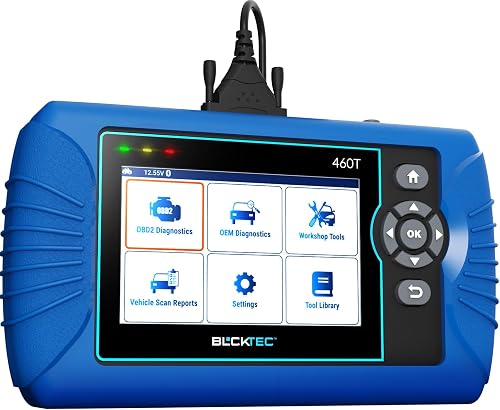
- Engine, transmission, ABS and SRS codes
- 12+ reset functions
- Live data and freeze frame
- 4.3 in screen
The 460T is a step up for shoppers who need broader system scans and service functions. Availability depends on the vehicle, and it is supported only in the USA and Canada.
Pros
- Reads engine, transmission, ABS and SRS codes
- Offers 12+ reset functions
- Includes live data and freeze frame data
Cons
- Functions vary by vehicle
- Use is limited to the USA and Canada
The BLCKTEC 460T reads engine, transmission, ABS and SRS codes and offers 12 or more reset functions. Support varies by vehicle, and the scanner and RepairSolutions2 app are intended for use in the USA and Canada.
This makes it a better match for a home mechanic who needs more systems and service tasks. Skip it if you only need basic engine checks or live data, and verify compatibility before counting on a particular reset function.
Foxwell NT301 for engine data graphs
Foxwell NT301 Code Reader: Best for engine graphs
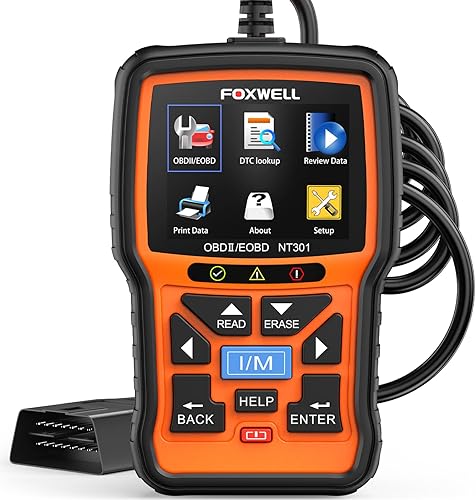
- Engine code reading and clearing
- Live data graphing
- I/M readiness hotkeys
- 2.8 in color screen
The NT301 focuses on engine diagnostics, live data graphs and emissions readiness. It does not scan ABS, EPB or A/C systems and does not offer special reset functions.
Pros
- Graphs and logs live sensor data
- I/M readiness hotkeys and LED indicators
- Supports common OBD2 protocols
Cons
- Does not scan ABS, EPB or A/C systems
- No special reset functions
The Foxwell NT301 focuses on engine codes, live data graphs and emissions readiness. It suits someone who wants to see and record engine readings, but not someone who needs ABS, EPB, A/C or special reset functions.
Innova 5310 for SRS diagnostics
Innova 5310 ABS and SRS Code Reader: Best for SRS checks

- ABS and SRS diagnostics
- Battery and alternator tests
- Live data
- Oil reset
- 2.8 in screen
Consider the 5310 if SRS diagnostics are part of your needs. Its ABS and SRS support still varies by vehicle, so verify coverage before choosing it over the 5210.
Pros
- Adds SRS diagnostics to its stated functions
- Includes live data and battery tests
- RepairSolutions2 app support
Cons
- Vehicle coverage varies
- Exact function support needs checking
The Innova 5310 is worth considering if SRS diagnostics matter, since its stated functions include ABS and SRS along with battery tests and live data. Vehicle coverage varies, so confirm both systems for your specific car before choosing it over the 5210.
How can you avoid common scanner mistakes?
Record the code and relevant readings before clearing anything. Clearing codes can remove useful diagnostic context and resets emissions readiness monitors, which then need a complete drive cycle to return.
Don't assume that an engine code reader supports every module in your car. Check ABS and oil reset separately, and remember that a code is a clue about a system or condition, not automatic proof that one named part has failed.
If the scanner won't connect, check the ignition position and cable seating first. A loose connector or ignition setting can interrupt communication even when the vehicle and scanner are otherwise compatible.
Is the Innova 5210 worth choosing?
Choose the Innova 5210 if you want engine code reading, live data and a battery test in one handheld scanner. Before buying, verify ABS or oil reset support if you need either feature on your exact vehicle.
Pick the Foxwell NT301 for engine data graphs, the 5310 if you need supported SRS diagnostics, or the BLCKTEC 460T for broader system scans and service functions. For more options matched to home use, see our car diagnostic tools for home use.
Frequently asked questions
Does the Innova 5210 read ABS codes?
The Innova 5210 can read and clear ABS codes on supported vehicles, but coverage varies by year, make and model. Check Innova's Coverage Checker with your vehicle details before buying, and confirm the specific ABS function you need rather than assuming all cars support it.
Can the Innova 5210 test a car battery?
Yes. The 5210 includes a battery test function that checks alternator health as well.
Use that information as an initial check when investigating a starting or charging concern, then seek a fuller electrical diagnosis if the problem continues.
Does the Innova 5210 show live data?
Yes. The 5210 displays OBD2 live data such as RPM, engine temperature, fuel trims and oxygen sensor readings.
These values add context while you investigate an engine concern, though they take some vehicle knowledge to interpret.
Does clearing a code reset emissions readiness?
Yes. Emissions readiness monitors reset after a battery disconnect or code clear, then need a complete drive cycle to repopulate.
Check I/M readiness again before an inspection; clearing a warning light does not by itself mean the vehicle is ready to pass.