OBD2 Scanner Not Connecting? Easy Fixes to Try
If your OBD2 scanner is not connecting, check that the plug is fully seated, turn the ignition to ON, and follow the adapter app's connection steps. Then check vehicle compatibility and the scanner's power or connection indicators.
On this page (9 sections)
- What should you check first when an OBD2 scanner will not connect?
- Is the scanner plug fully seated in the OBD2 port?
- Does the ignition need to be on for a scanner to connect?
- Why is a Bluetooth OBD2 scanner not connecting to a phone?
- Could the scanner or app be incompatible with your car?
- What if the OBD2 port has no power?
- Should you clear codes or disconnect the battery to fix a connection?
- When should you stop troubleshooting and get help?
- Which fix should you try for an OBD2 scanner that is not connecting?
If your OBD2 scanner is not connecting, seat the plug firmly, switch the ignition to ON, and follow the phone app's connection steps. Next, confirm that the scanner supports your vehicle and that the port is supplying power.
Start with the easy checks before replacing a scanner. A loose plug, wrong app, or unsupported vehicle feature can look like a failed adapter.
What should you check first when an OBD2 scanner will not connect?
Check the plug, ignition, app, and vehicle compatibility in that order. These steps address common connection problems without changing vehicle settings or clearing codes.
- Push the scanner connector firmly into the OBD2 port.
- Turn the ignition to ON, with the engine off, unless your scanner's instructions say otherwise.
- Open the correct app and follow its connection prompts.
- Check that the scanner supports your vehicle's make, model, and year.
- Look for a power or connection indicator on the scanner or in the app.
If you don't know where the port is, use our guide to find the OBD2 port in your car. Its exact position varies.
Is the scanner plug fully seated in the OBD2 port?
A loose connector can prevent a scanner from getting power or communicating with the car. Push it in straight until it feels secure, and don't force it if it won't fit.
Check that the connector is facing the right way and that nothing blocks the port. A bent pin, damaged port, or connector that won't stay in place needs careful inspection; stop if you see damage.
Could a phone adapter be loose even if it looks plugged in?
Yes. A small wireless adapter can feel connected before its plug is fully seated.
Remove it, check the port for an obstruction, and plug it back in firmly.
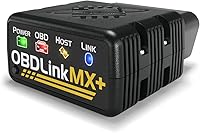
If the adapter powers on but the app can't connect, continue with the phone and app checks below. OBDLink recommends checking its troubleshooting guide for vehicle compatibility and features.
Does the ignition need to be on for a scanner to connect?
Often, the ignition needs to be switched to ON so the vehicle's control systems are awake. You can usually try this with the engine off, but follow the scanner's instructions.
Some cars have more than one ignition position. Choose the position that powers the dashboard without starting the engine, then try the connection again.
The INNOVA 5210 troubleshooting guidance says to switch the ignition to ON before plugging in. It also advises pressing the connector firmly into the port until it clicks.
If the scanner remains off, check its cable and the port. A scanner that has no power may point to a vehicle power issue, a damaged connector, or a tool problem.
Why is a Bluetooth OBD2 scanner not connecting to a phone?
Check Bluetooth, app permissions, and the adapter's setup steps. Some scanners connect from inside their app, so follow the app's prompts instead of relying only on your phone's general Bluetooth menu.
Keep your phone close to the adapter, turn Bluetooth on, and close then reopen the app. If the adapter appears in the phone's paired-device list, follow the manufacturer's instructions before removing or resetting that pairing.
For iPhone-specific options, see our guide to OBD2 scanners for iPhone. The app and phone operating system must both support the scanner.
Does the scanner need a particular app?
Yes, a scanner may depend on a specific app or compatible third-party software. Confirm the app name and supported phone or computer before troubleshooting further.
The OBDLink MX+ supports iOS, Android, and Windows and is recommended for several apps, including FORScan, Torque, BimmerCode, Dashcommand, AlfaOBD, and Carista. App features and vehicle support can vary, so check compatibility for your setup.
If the app opens but does not find the adapter, restart the app and phone, then repeat the setup steps. Don't install an unrelated app just because it recognizes Bluetooth devices.
Could the scanner or app be incompatible with your car?
Yes. Compatibility can depend on the car's make, model, year, and the system or code you want to read.
Check the tool's compatibility guidance for your exact vehicle before treating a failed scan as a connection fault.
A scanner may connect to the engine system but not support a particular ABS, airbag, transmission, or other system on your vehicle. Read the compatibility notes for the feature you need, not just the vehicle's general OBD2 support.
BlueDriver works with North American gasoline vehicles from 1996 onward and select light diesels. System coverage depends on the vehicle, so check compatibility for the exact make and model.
If the scanner connects but returns no codes, our guide to reading OBD2 codes explains what to check next. A connection and code-reading issue are not always the same problem.
What if the OBD2 port has no power?
If the scanner stays off after you reseat it and switch the ignition on, the port may not be supplying power. Check your vehicle manual for fuse and diagnostic-port guidance, or ask a qualified technician to inspect it.
Don't bridge pins or insert metal objects into the port. Incorrect probing can damage vehicle electronics or create a short.
If another compatible scanner also stays off, that makes a vehicle-side power issue more likely, but it doesn't prove the cause. If a different scanner powers on, check the original scanner's connector and instructions.
Should you clear codes or disconnect the battery to fix a connection?
No. Clearing codes or disconnecting the battery does not fix a basic pairing or plug problem.
It can also erase useful diagnostic information or reset readiness monitors.
First get a stable connection and read the codes. Then decide what to do based on the code and the vehicle's service guidance.
If a warning light prompted the scan, read what the check engine light means before clearing anything. The light alone does not identify a failed part.
When should you stop troubleshooting and get help?
Stop if the port or connector looks damaged, the scanner gets unusually hot, or you smell burning. A mechanic can check the vehicle's port and power supply.
Also get help if several compatible scanners fail on the same car, or if the warning light comes with symptoms such as stalling, overheating, or loss of power. Don't keep driving when the car feels unsafe.
Which fix should you try for an OBD2 scanner that is not connecting?
For an OBD2 scanner not connecting, start with a firm plug and ignition ON, then check the app, connection steps, and exact vehicle compatibility. If the tool has no power, inspect the vehicle-side port with the manual or a technician's help.
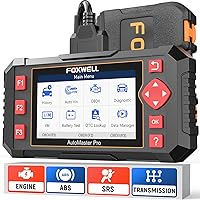
Choose a wired reader such as the Innova 5210 if you want to avoid phone pairing. Choose a phone adapter if your phone and preferred app are supported; compare the car diagnostic tool buying guide before deciding.
If the scanner connects but you see a warning light, use the code and vehicle symptoms to choose the next step. Our guide to driving with the check engine light on explains when to stop and seek service.
Frequently asked questions
Why is my OBD2 scanner not connecting to my car?
A scanner may fail to connect if its plug is loose, the ignition is off, the vehicle is outside its supported range, or the phone app has not connected to the adapter. Reseat the plug, switch the ignition to ON, and follow the scanner and app instructions.
Should the car be running when I connect an OBD2 scanner?
Many code readers can connect with the ignition switched to ON and the engine off. That powers the vehicle systems without running the engine.
Follow the instructions for your scanner, and keep the vehicle in a safe, stationary place while you connect and read codes.
Why won't my Bluetooth OBD2 scanner pair with my phone?
Check whether the scanner connects through its own app or requires another setup step. Keep the phone nearby, enable Bluetooth, close and reopen the app, and follow its connection prompts.
Also confirm that the phone's operating system and the scanner are compatible.
How do I know if my car's OBD2 port has power?
Check the scanner's power indicator or screen after plugging it in, if it has one. If it stays off, reseat the connector and consult the vehicle manual or a qualified technician about the port's power supply.
Avoid probing connector pins unless you know the correct procedure.