Pending Code vs Stored Code: What Is the Difference? (October 2026)
A pending code is a fault the car has detected but not yet confirmed; a stored code is a fault saved by the vehicle’s computer. In a pending code vs stored code check, status helps you understand what the computer recorded, but it does not name the repair.
On this page (8 sections)
- Pending code vs stored code: what is the difference?
- What can make a pending code become stored?
- How should you read pending and stored codes?
- Should you clear a pending or stored code?
- How do you choose a scanner for pending and stored codes?
- How should you set up and use a code reader?
- What common code-reading mistakes should you avoid?
- How do you decide what to do next?
A pending code is a fault the car has detected but not yet confirmed; a stored code is a fault saved by the vehicle’s computer. In a pending code vs stored code comparison, status tells you how the computer classified an event, not which part needs repair.
A pending code may become stored if the condition happens again and meets the vehicle’s confirmation rules. A stored code can remain available after the fault stops occurring, so it does not always mean the problem is active right now.
Read the code and its status before clearing anything. For the code-reading steps, see how to read OBD2 codes from your car.


Pending code vs stored code: what is the difference?
Pending means detected but not yet confirmed; stored means recorded by the vehicle computer. The exact rules depend on the vehicle and the system that reported the fault.
A pending code can flag an intermittent condition. A stored code shows the computer saved a fault under its own criteria, but the code alone does not tell you whether the problem is still happening.
| Status | What it generally means | What to do |
|---|---|---|
| Pending | A fault condition was detected, but may not have been confirmed | Record the code, check for symptoms and scan again if needed |
| Stored | A fault was saved by the vehicle computer | Review the code and supporting data before deciding on a repair |
| Both | The vehicle may report the same code in more than one status | Note each status and use the vehicle-specific diagnostic process |
These labels describe code status, not severity. A pending code can still relate to a problem that needs attention, while a stored code may describe an intermittent fault that is not present during the scan.
Does a pending code mean the check engine light will come on?
Not necessarily. A pending engine code may exist before the vehicle turns on the check engine light, but warning-light behavior depends on the fault and the vehicle’s rules.
If the light is on or flashing, take that seriously and consider the symptoms. Our guide on whether you can drive with the check engine light on explains how to think about the warning and when to stop driving.
Can a stored code remain after a problem stops?
Yes, a stored code can remain after the condition is no longer happening. The computer may retain it until it is cleared or until vehicle-specific conditions remove it.
That is why code status should be read alongside current symptoms and other scan information. A single stored code is a clue, not a complete diagnosis.
What can make a pending code become stored?
A pending code may become stored when the computer detects the same fault again and the vehicle’s confirmation rules are met. Those rules can vary by code, system and vehicle.
Some checks happen only when particular conditions occur, such as a certain engine temperature or driving pattern. If those conditions do not happen again, the code might stay pending for a time or no longer appear on a later scan.
Do not assume a fixed number of trips applies to every vehicle. The owner’s manual or service information for your vehicle can explain how its monitors and warning lights work.
A scan tool may show more than one status or related detail. Save the code, status and any available freeze frame data before clearing it; freeze frame data can capture vehicle conditions around a detected fault.
Could a pending code disappear on its own?
It can stop appearing if the condition does not return, but that does not prove the cause is fixed. Intermittent faults may not show up on every drive or scan.
Keep a note of when the code appeared, whether a warning light came on and what the car was doing. If symptoms continue, get the issue checked even if a later scan no longer shows the pending code.
How should you read pending and stored codes?
Scan for both statuses, record the exact code, and compare it with symptoms before choosing a next step. A code description is a starting point, not a parts replacement instruction.
Use the scanner’s menus to select the relevant system and code status. If the tool offers freeze frame or live data, save the information before clearing codes.
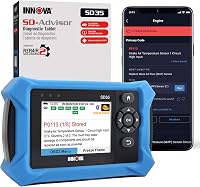
For a basic engine-code check, the Innova 5210 Code Reader reads and clears engine codes and shows selected live data and readiness status. {{product B07Z46L5FG | Its engine-code and live-data functions can help you record what the vehicle reports before deciding what to check next.}}
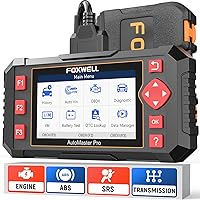
A fault outside the engine system may need a scanner that can access that system. The Foxwell NT604 Elite Scanner covers engine, ABS, SRS and transmission diagnostics, with live data and a DTC library. {{product B08PFJMTY3 | Its multi-system coverage can help when the warning or code may involve ABS, SRS or transmission.}}
The BLCKTEC 460T Code Reader provides freeze frame and live data, as well as diagnostics for engine, transmission, ABS and SRS. {{product B0DV2N2FND | Freeze frame data can give you another clue about the conditions recorded around a fault.}}
Check compatibility for your exact year, make and model before relying on a scanner’s system coverage. A tool may support a system on one vehicle and have different functions on another.
What should you write down before clearing codes?
Record the code, its status, warning lights, symptoms and available freeze frame data first. This preserves clues that may disappear after a clear.
Note when the warning appeared and whether the vehicle was cold, warm, idling or moving. Do not guess at missing details; a clear record of what you observed is more useful than a speculative diagnosis.
Should you clear a pending or stored code?
Clear a code only after recording it and deciding that clearing is part of your diagnostic or repair process. Clearing a code does not repair the condition that caused it.
A code may return if the fault remains. Clearing can also reset readiness monitors, which then need driving conditions to run again; that may affect emissions-test readiness.
For the steps and cautions, see how to clear the check engine light with a scanner. If the light returns, scan again and compare the new code and status with your notes.
A common mistake is to clear a code just to see whether the warning comes back. That can remove useful context and make a later diagnosis harder, especially if the problem is intermittent.
Another mistake is to replace a part based only on a code label. A code points to a system or condition the computer detected; inspect the related evidence and follow vehicle-specific diagnostic steps before buying parts.
How do you choose a scanner for pending and stored codes?
Choose a scanner for the systems and information you need, then confirm its coverage for your vehicle. A basic engine check calls for less access than investigating an ABS, SRS or transmission warning.
The Innova 5210 suits a driver who mainly wants engine-code access, selected live readings and readiness checks. It also functions as a battery tester and offers an oil reset, but ABS coverage and other functions vary by vehicle.
Skip it if your main need is broad access to multiple control systems or if the needed feature is not confirmed for your car.
The Foxwell NT604 Elite suits an owner who wants to scan engine, ABS, SRS and transmission systems from one corded tool. It includes live data and playback, but it does not support maintenance resets or relearns.
Skip it if a service function such as ABS bleeding, battery registration or throttle relearn is the reason you are buying a scanner.
The BLCKTEC 460T suits a home mechanic who wants freeze frame information alongside multi-system diagnostics and live data. Its functions vary by vehicle, and the tool and RepairSolutions2 app are for use in the USA and Canada.
Skip it if you are outside those regions or need a feature that has not been verified for your exact vehicle.
Think about what you plan to do after reading a code. If you only want to identify a check-engine code, a simpler tool may be enough; if you need another system or additional data, prioritize that capability rather than a long feature list.
For a broader overview of scanner types and features, see our plain guide to car diagnostic tools. If you also need to compare tools for changing engine readings while the car runs, our guide to OBD2 scanners with live data explains what those displays can help you inspect.
How should you set up and use a code reader?
Start with a secure connection and follow the scanner’s vehicle-selection steps. A poor connection or the wrong system menu can make a basic code check confusing.
Park safely and locate the OBD2 port, usually under the dashboard. The OBD2 port location guide can help if you cannot find it; do not force the connector if it does not line up.
For the Innova 5210, turn the ignition to ON with the engine off before plugging in, then press the connector firmly until it clicks. Follow the instructions for your own scanner, since menus and connection steps can differ.
Choose the vehicle and system as prompted, then read pending and stored codes separately if the tool offers those choices. Write down the full code and status, and save supporting data before using any clear function.
Do not treat a scan result as a repair command. Check symptoms, vehicle-specific service information and the conditions recorded with the fault; get qualified help when the issue is outside your experience.
What common code-reading mistakes should you avoid?
Keep the code, status and symptoms together so you do not mistake one scan result for a diagnosis. The details around a fault can matter as much as the code itself.
Avoid clearing codes before recording them. A reset can erase information that would help explain an intermittent issue, and it may reset readiness monitors.
Do not assume a pending code is harmless because the warning light is off. Monitor for changes, and respond promptly if the vehicle runs poorly, overheats, loses power or shows another serious symptom.
Do not assume a stored code is current simply because it remains saved. Check whether it returns after a repair or under the conditions that originally triggered it, and use the scan tool’s status details where available.
Finally, do not assume every scanner can read every system on every vehicle. Coverage can differ by year, make, model and feature, so check compatibility before buying and before relying on a code read.
How do you decide what to do next?
Use the status as one clue: record a pending code and watch for recurrence, while investigating a stored code with its symptoms and supporting data. Choose the scanner that covers the system you need and verify its vehicle fit first.
Pick the Innova 5210 for straightforward engine checks and readiness information. Choose the Foxwell NT604 Elite when you need access to several system groups, or the BLCKTEC 460T when freeze frame data is a priority and its regional and vehicle coverage suit you.
For code interpretation, begin with how to read OBD2 codes. In the pending code vs stored code decision, the status helps guide your next check, while the code, symptoms and vehicle-specific information determine what to do.
Frequently asked questions
Does a pending code mean something is broken?
A pending code means the vehicle detected a condition that may need attention, but it has not necessarily met the rules to confirm and store a fault. It can point to an intermittent issue or an early sign of a problem.
Read the code and check for symptoms instead of treating the status alone as a diagnosis.
Will a pending code turn into a stored code?
It may, if the vehicle detects the same fault again under the conditions its computer checks. The timing and confirmation rules vary by vehicle and system, so a pending code can also disappear if the condition does not return.
Keep a record of the code and any warning light or driving symptoms.
Can you clear a pending code?
A scanner may let you clear codes, but clearing them erases useful diagnostic information and may reset readiness monitors. If the fault is still present, it can return.
Record the code and any freeze frame data first, then diagnose the cause before clearing it.
Is a stored code the same as an active fault?
Not always. A stored code means the computer saved a fault, but the condition may no longer be happening at the moment you scan.
Check whether the code is current, pending or historic if your scanner reports those states, and consider symptoms and freeze frame data.
Can a basic scanner read pending codes?
Many OBD2 scanners can read pending engine codes, but support and the way codes are labeled vary by tool and vehicle. Check the scanner's coverage for your car, and read the instructions for selecting pending, stored or confirmed codes.