XTOOL A30M vs A30D: Which Is Better? (October 2026)
For xtool a30m vs a30d, choose the A30M if its larger reset list matches your repair plans, or the A30D if its 19 functions cover your jobs. Both offer bidirectional control, full-system scans, and lifetime app service-function updates.
On this page (11 sections)
- XTOOL A30M vs A30D: what is the main difference?
- Do both XTOOL scanners support bidirectional control?
- How do system scans and live data compare?
- Which scanner is easier to set up with a phone?
- What do CAN FD and FCA AutoAuth mean for your choice?
- Who should choose the A30M?
- Who should choose the A30D?
- What should you know about updates and ongoing access?
- Is the TOPDON TopScan Lite a useful alternative?
- What common buying and use mistakes should you avoid?
- XTOOL A30M vs A30D: which should you buy?
For xtool a30m vs a30d, choose the A30M if you want more listed reset options, or the A30D if its 19 functions match your maintenance plans. Both are wireless bidirectional scanners with full-system diagnostics and lifetime software updates for app service functions.
The A30M's longer menu is useful only when it includes a procedure your car supports. Check your vehicle's make, model, year, and the specific job before deciding.

XTOOL A30M vs A30D: what is the main difference?
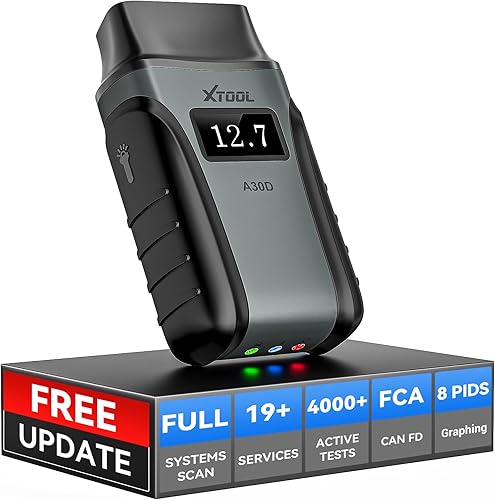
The A30M lists 26+ reset and relearn functions, while the A30D lists 19. Their shared core includes active tests, full-system scans, live data, and wireless phone or tablet use.
The A30M names oil, EPB, SAS, ABS brake bleeding, throttle body relearn, injector coding, crank sensor relearn, headlight adjustment, and tire size reset. The A30D includes oil, EPB, TPMS, ABS auto bleeding, SAS, BMS, throttle relearn, injector coding, gear learning, and transmission match.
Those examples show why the function count alone is a weak buying rule. If you need a TPMS reset or headlight adjustment, first confirm that the exact procedure is supported for your vehicle rather than assuming a feature transfers across all models.
Does the A30M have more reset functions than the A30D?
Yes, the A30M lists more reset functions, but the right scanner depends on vehicle support and the job. Some vehicles handle a function themselves, so a scanner may not display that option.
Write down the procedures you expect to use, such as an oil reset after service or an electronic parking brake release for a supported brake job. Ask XTOOL to confirm those functions for your exact car before purchase.
Do both XTOOL scanners support bidirectional control?
Yes, both can send commands to a vehicle's ECU for supported active tests. These commands can help you see whether a component responds, adding a useful check beyond reading a stored fault code.
The A30M lists tests involving fuel pumps, injectors, A/C clutches, windows, and sunroofs. The A30D names fuel pumps, valves, wipers, windows, doors, sunroofs, and headlamps.
Active tests are not universal. A command available for one make or year may not appear for another, and a response does not by itself prove the whole system is healthy.
Start with the vehicle's symptom and scan for codes before running a test. Our guide to reading OBD2 codes explains how to use a code as a diagnostic clue instead of treating it as a parts replacement instruction.
How do system scans and live data compare?
Both tools scan available vehicle systems and show up to 8 live readings at once. The A30M highlights real-time graphing, while the A30D also describes graphs and data logging for later playback.
Their system examples include engine, transmission or gearbox, ABS, SRS, and A/C. The exact modules and data points depend on the vehicle, so confirm access for the system you need to inspect.
Live data is most useful when you know which reading relates to the symptom. For example, you can compare readings while a problem occurs, then use the vehicle's service information to decide what they mean.
For saved readings captured when a fault sets, see our guide to freeze-frame data.
If reviewing a recorded drive is important, the A30D's data logging description may make it a better fit, provided the app supports the workflow you need. If you mainly want to watch live graphs, either tool may suit you.
Which scanner is easier to set up with a phone?
Both connect wirelessly through a phone or tablet, so check your device and app before the first scan. The A30M specifies Bluetooth 4.0 and support for iOS and Android; the A30D specifies Android 9.0 or later and iOS 10.0 or later.
A practical setup starts with installing the Anyscan app and activating the dongle in the app. Then locate the vehicle's OBD2 port.
With the scanner plugged in, switch on the ignition and follow the app's pairing instructions. The A30D setup information calls for turning on the ignition and starting the car.
Keep the phone close to the vehicle during setup, and grant the app any connection permissions it requests. A listed wireless range of up to 33 feet gives room to move around during supported tests, but a weak connection or incorrect pairing can still interrupt a session.
If the app does not connect, check that the dongle is firmly seated, the ignition is on, and the phone's Bluetooth is active. Follow our steps for fixing an OBD2 scanner that won't connect before assuming the car or scanner has a fault.
What do CAN FD and FCA AutoAuth mean for your choice?
Both scanners list CAN FD and FCA AutoAuth support, but those features apply only to relevant vehicles and may require a separate account. The A30M specifies CAN FD support for GM models from 2020 onward and FCA AutoAuth for Chrysler, Jeep, Dodge, and Fiat models from 2018 onward.
For vehicles that require FCA AutoAuth, the A30M needs separate registration and payment through the official service. The A30D requires a personal AutoAuth account and active subscription.
This access is separate from the lifetime software updates included for app service functions.
Don't treat protocol support as a promise that every system or procedure is available. Confirm the vehicle, model year, and diagnostic task with XTOOL before relying on either scanner for a specific job.
Who should choose the A30M?
Choose the A30M if you want its broader reset menu and have confirmed that your vehicle supports the procedures you plan to use. It suits a DIY owner maintaining a compatible vehicle who wants service functions as well as full-system scans and active tests.
Its listed options include jobs such as headlight adjustment and tire size reset, along with common maintenance and relearn functions. It may be a poor fit if you only need to read basic engine codes, if none of the extra resets apply to your car, or if you have not checked coverage.
Before buying, make a short list of your car's make, model, year, and likely repair tasks. Confirm those tasks directly, especially for ABS bleeding, injector coding, or electronic parking brake work, where the procedure must match the vehicle.
Who should choose the A30D?
Choose the A30D if its 19 listed resets cover your planned work and you value its described data logging. It has the same broad categories of diagnostics and bidirectional control as the A30M, with a different service-function mix.
Its listed functions include TPMS and BMS resets, gear learning, and transmission match. Those options may matter more to your vehicle than extra entries in the A30M menu.
Skip the A30D if a required procedure is missing or XTOOL cannot confirm support for your specific vehicle. Its smaller function count is not a limitation if it covers your jobs, but guessing from a general list can lead to buying a tool that lacks the one function you need.
What should you know about updates and ongoing access?
Both XTOOL models include lifetime free software updates for app service functions. That makes them easier to plan around than a tool whose core app functions require a recurring subscription, but FCA AutoAuth remains a separate requirement for applicable vehicles.
The A30D describes 22 languages, and the A30M also supports 22. English is the default; changing language requires contacting XTOOL with the device serial number.
If keeping advanced features without a subscription is a priority, compare the XTOOL update terms with alternatives before choosing. Our professional OBD2 scanner guide covers the capabilities to weigh for a home garage, and the Autel scanner guide offers another brand comparison.
Is the TOPDON TopScan Lite a useful alternative?
Consider the TOPDON TopScan Lite if in-app repair guidance matters more to you than lifetime access to advanced features. It includes a repair database and TopFix AI assistant, alongside bidirectional control and full-system scanning.
It lists 8+ hot resets. Advanced features, including bidirectional control, service functions, live data, code clearing, and AI features, are included for the first year; continuing those features after that requires a subscription.
That makes the TopScan Lite a different kind of choice. Compare how long you expect to use its advanced tools with the XTOOL models' lifetime software updates for app service functions.
What common buying and use mistakes should you avoid?
The most common mistake is choosing by the reset count instead of checking the exact vehicle and function. A scanner can list a procedure without supporting it on every model year or trim.
Another mistake is assuming that an OBD2 connection means complete access to every module. Confirm the engine, transmission, ABS, SRS, or other system you need before purchase, and check FCA AutoAuth requirements for applicable vehicles.
Don't clear codes before recording them and reviewing any available freeze-frame details. Clearing can remove useful context, and a reset function should be used only when the related maintenance or repair has been completed.
For routine use, keep the phone charged, update the app when appropriate, and disconnect the scanner after the diagnostic session. Store the dongle where its connector stays clean and dry, and avoid running active tests unless you understand the procedure and its effect on the vehicle.
XTOOL A30M vs A30D: which should you buy?
Pick the A30M when its extra reset options match jobs your vehicle supports; pick the A30D when its 19 functions cover your needs or its data logging suits your workflow. Skip both if you only need basic code reading or if XTOOL cannot confirm the exact coverage you require.
Before checkout, verify your car's year and the specific diagnostic functions, check your phone's operating system, and account for any FCA AutoAuth access. That short compatibility check matters more than the headline reset count.
For a broader view of tools for home use, read our guide to car diagnostic tools for home use. The right scanner is the one that supports your vehicle and the repair tasks you can safely perform.
Frequently asked questions
What is the difference between the XTOOL A30M and A30D?
The A30M lists 26+ reset functions, while the A30D lists 19. Both offer bidirectional control, full-system diagnostics, lifetime software updates, and support for CAN FD and FCA AutoAuth.
Which functions work depends on the vehicle, so check coverage for your make and year.
Do the XTOOL A30M and A30D need a subscription?
Both XTOOL scanners include lifetime software updates for app service functions without an ongoing subscription. FCA AutoAuth access is separate for some vehicles: the A30M requires registration and payment, while the A30D requires a personal account and active subscription.
Can the A30M or A30D run active tests?
Yes. Both support bidirectional control, which sends commands to a vehicle's ECU for active tests.
The parts you can test depend on the vehicle and function support.
Confirm compatibility for your specific car before relying on either scanner for a repair.
Does the XTOOL A30M have more reset functions than the A30D?
The A30M lists 26+ reset functions, and the A30D lists 19. Examples on the A30M include oil, EPB, SAS, ABS brake bleeding, throttle body relearn, and injector coding.
Available functions vary by vehicle model and year.