9 Best OBD2 Scanners for Japanese Cars (November 2026)
The best OBD2 scanners for Japanese cars include the MOTOPOWER MP69033 for most Japanese car owners, the Zmoon ZM201 for live data on a color screen, and the FIXD Bluetooth OBD2 Scanner for drivers who want plain-English answers.
On this page (5 sections)
The best OBD2 scanner for Japanese cars is the MOTOPOWER MP69033, which reads and clears engine codes on Asian vehicles from 2000 on and puts the code definitions right on its screen. Choose the Zmoon ZM201 for live data graphs, the BlueDriver for ABS and airbag codes, or the FIXD if you would rather read plain-English explanations on your phone.
Japanese brands follow the same OBD2 standard as everyone else in the US, so almost any compliant reader will talk to a Toyota, Honda or Nissan. What separates the picks is how deep they scan, how the results are shown, and whether the car is old enough to fall outside a scanner's stated year range.
This guide covers 9 handheld and phone-based scanners at different price tiers. If you mainly want to watch sensor data while you drive, our roundup of the best OBD2 scanners with live data goes deeper on that feature.
Our picks at a glance
-
1

-
2

-
3

Which OBD2 scanner fits your Japanese car?
The MOTOPOWER is the safest starting point for most owners of Japanese cars, and the rest of the list fills in specific gaps. Pick by the light on your dash and the systems you need to read.
The quick way to narrow it down is to ask two questions: what light is on, and what year is the car. If the answer is a single check engine light and a model from 2000 or later, a basic engine reader is all you need.
If the answer involves an ABS light, an airbag warning or a transmission fault on a newer model, you are looking at the top two price tiers. The sections below walk through each scanner with that split in mind.
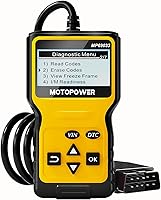
MOTOPOWER MP69033: Best for most Japanese car owners
- Built-in DTC lookup library
- Reads live data and freeze frame
- 2.7-inch LCD with backlight
- Powered from the OBD2 port
A budget handheld that covers engine diagnostics on Asian cars from 2000 on, with live data and a code library on screen.
Pros
- Low price tier
- Built-in DTC definitions
- No battery needed
Cons
- No ABS or SRS codes
- Small mono screen
The MOTOPOWER earns the top score because it covers the basics well and costs very little. It reads and clears engine codes, shows freeze frame data and stores a built-in dictionary so a P0171 means something on screen without a phone in your hand.
The 2.7-inch LCD has a backlight and contrast control, so it stays readable in a garage or a parking lot. Six buttons handle scrolling and a quick VIN lookup, and the 2.5-foot cable is thick and flexible enough to reach an awkward port.
It weighs just over 10 ounces and measures under 3 inches wide, so it slides into a glovebox or a door pocket without taking up room. The 128x64 resolution is modest but enough for a code number and its definition.
It draws power from the OBD2 connector, so there is no battery to replace. It also supports nine protocols and six languages, so a gray-import model has a better chance of talking to it.
On the downside, it does engine codes only. ABS, airbag and oil service lights are out of reach, which matters if your Civic or Camry has a light beyond the check engine warning.
Its 30-day warranty is the shortest on this list, so test it early on your own car.
Zmoon ZM201: Best for live data on a color screen
- 2.8-inch color display
- Live data stream in graph view
- 50,000+ built-in DTC database
- Lifetime free software updates
A color-screen code reader that plots live sensor data and covers engine faults on Asian vehicles from 2008 on.
Pros
- Graph view for live data
- Light and dark display modes
- Free updates
Cons
- Engine diagnostics only
- Later Asian coverage cutoff than some rivals
Zmoon suits someone who wants to see the numbers move. The 2.8-inch color screen shows live sensor data as a graph, and it adds O2 sensor tests and EVAP checks on top of basic code reading.
The resolution is 320x240, which is sharper than the mono screens on the cheapest picks.
The 50,000-entry fault code database covers the usual engine problems, and the display has light and dark modes for bright or dim spaces. Results appear within seconds of turning the ignition on.
A PC connection is optional and lets you review or print data, though the software runs on Windows XP through 10 and not on a Mac. A shortcut key jumps straight to the read function, and status indicators show whether the car is ready to scan.
It also supports the main OBD2 protocols, just as the MOTOPOWER does. The trade-off is coverage timing.
Zmoon lists 2008 as the start year for Asian cars, which is later than MOTOPOWER's 2000, so an older Toyota or Honda may not be fully supported. It also stays in the engine bay like the MOTOPOWER, with no ABS or airbag access.
It does not work on hybrid or new-energy vehicles either. The 3-year warranty is a step up from the MOTOPOWER's 30 days.
Choose it if graph view matters more than the earliest possible coverage, and skip it for a 2003 model where the year range leaves doubt.
FIXD Bluetooth OBD2 Scanner: Best for drivers who want plain-English answers
- Bluetooth to iPhone and Android
- 39,000+ issue explanations
- Free app with unlimited scans
- Tracks mileage reminders
A phone-based scanner that translates engine codes into plain English and keeps a scan history for each car in the household.
Pros
- Explains codes in everyday language
- Handles several cars in one app
- Stays plugged in under the dash
Cons
- Needs a phone and the app
- Advanced features sit behind a premium trial
FIXD is for the owner who does not want to learn code numbers. The Bluetooth plug reads the engine computer and the free app turns the result into a sentence, with an urgency level attached to each fault.
It also warns when a problem is severe enough to stop driving.
It covers 39,000+ issues across thousands of vehicles and supports gasoline and hybrid cars from 1996 on. Diesel coverage starts in 2006.
The app keeps a separate history for each car in the family and tracks mileage reminders, so a two-car driveway stays organized.
You can also share a scan with a shop or a family member, which helps when someone else drives the car. The plug itself is tiny, about an inch and a half long and under an ounce, so it hides under the dash and stays there.
Because it stays in the port, it is ready the next time a light appears. The app needs a phone, though, and the advanced features sit behind a premium trial that runs out.
Basic code reading stays free.
There is no manufacturer warranty, so treat the trial period as your test window. For a phone-first approach on an iPhone, see our roundup of the best OBD2 scanners for iPhone.
VDIAGTOOL VD10: Best for smog check readiness

- I/M readiness for emissions tests
- Live data and freeze frame
- 3,000+ code definitions on screen
- Warranty term varies by source
A compact handheld built around emissions readiness checks, useful before a Japanese car goes in for inspection.
Pros
- Clear I/M readiness menu
- Reads VIN and calibration IDs
- Long warranty
Cons
- Latest Asian coverage cutoff here
- Two-line display only
VDIAGTOOL focuses the VD10 on one job: telling you whether a car is ready for an emissions test. The I/M readiness screen shows which monitors have completed, which is the usual reason a Japanese car fails a smog check after a battery disconnect.
It also reads live data, freeze frame, VIN and calibration IDs.
The 3,000+ on-screen code definitions save a search, and the VIN and calibration ID readout is handy when you are checking whether a used car's ECU matches its paperwork. The bullet text promises a 5-year warranty while the spec sheet lists 3 years, so confirm the term when you buy.
Either way it is the longest coverage here.
It speaks six languages and supports all five OBD2 protocols. The kit includes the scanner, an OBDII connector cable and a manual.
The small two-line display is the weak point.
At 2.1 inches it is the smallest screen here, and you can scroll through live data values but not see them as a graph the way the Zmoon shows them. Asian car coverage starts at 2009, so older models fall outside the stated range.
It lists live data and freeze frame as features, so the data is there, just harder to follow.
Pick it if you are chasing a check engine light before an inspection. Otherwise the MOTOPOWER covers the same engine codes for less.
BlueDriver Bluetooth OBD2 Scanner: Best for ABS, SRS and transmission codes

- Reads ABS, SRS, airbag and TPMS codes
- No subscription fees
- VIN-matched repair reports
- Works with iOS and Android
A pro-grade phone scanner that reaches beyond the engine to ABS, airbag and transmission systems on many Japanese models.
Pros
- Covers non-engine systems
- One-time purchase, no subscription
- Live data while driving
Cons
- Highest price tier here
- Enhanced coverage varies by model year
BlueDriver is the step up when the engine light is not the whole story. It reads and clears ABS, SRS, airbag and TPMS codes on supported vehicles, so a flashing ABS light on a Subaru or Mazda gets a real answer instead of a guess.
BlueDriver says coverage is strongest on GM, Ford, Toyota, Honda, Nissan, Mazda and Subaru, which lines up well with Japanese makes.
Repair reports are matched to the VIN and include definitions, causes and confirmed fixes. There are no subscription fees and no account required, and the app shows live data as you drive.
Mode 6 test results and smog readiness are included too, which helps when a car keeps failing an inspection without a clear code.
This is the priciest pick in the group, and enhanced coverage still varies by model year. BlueDriver points buyers to a compatibility chart for the exact model, which matters most on 2024 and newer Nissan and Mazda cars.
It scans hybrids for standard emissions and engine codes.
It also handles select light-duty trucks and diesels, though the focus here is passenger cars. If you only ever see a check engine light, the MOTOPOWER does the same core job for far less.
Its 180-day money-back guarantee takes some of the risk out of the top price tier.
Innova 5210: Best for battery and alternator checks

- Scanner and battery tester in one
- Live data with drive cycle readiness
- Oil light reset
- RepairSolutions2 app
A handheld that pairs engine code reading with a battery and alternator test, plus an app for repair guidance.
Pros
- Battery health check built in
- ABS codes on some models
- No app subscription
Cons
- App needed for repair guidance
- ABS coverage varies by vehicle
Innova builds the 5210 around two tasks. It reads engine codes and ABS codes on some vehicles, and it also tests the battery and alternator, which helps on older Japanese cars where a weak battery causes odd warning lights.
The drive cycle readiness feature helps after a code clear, and the oil light reset means you can turn off the maintenance reminder after an oil change.
The RepairSolutions2 app adds step-by-step repair guidance, suggested parts and cost estimates without a subscription. The app needs a phone and an account, but the repair data is free.
Live data covers RPM, engine temperature, fuel trims and oxygen sensor readings.
The screen is 2.8 inches, so it stays readable, but ABS coverage varies by model. Innova asks buyers to run its coverage checker before ordering.
A quirk worth knowing: the readiness monitors reset after any battery disconnect or code clear and need a full drive cycle to come back.
That is normal car behavior, not a fault in the tool. The kit is just the reader, its attached cable and a quick start guide.
Choose it if you want battery health and engine codes from one tool, and for full four-system coverage, the Foxwell does more.
Our full Innova 5210 review covers its app and coverage in detail.
Foxwell NT604 Elite: Best for four-system diagnostics

- Engine, ABS, SRS and transmission scans
- 4.3-inch screen
- AUTOVIN reads the VIN for you
- 60+ car brands covered
A larger-screen tool that scans four systems on Asian brands, with VIN auto-detect and a protective case.
Pros
- Four-system coverage
- Big color screen
- Sturdy carry case
Cons
- Mid-range price tier
- No service reset functions
The Foxwell NT604 Elite is the most complete handheld here. It scans engine, ABS, SRS and transmission systems on 60+ brands, so a Japanese car with a transmission code or an airbag light can be diagnosed without a trip to the dealer.
It arrives with the latest software already loaded, so there is no download step before the first scan.
AUTOVIN fills in the VIN for you when it works, which saves typing on older models. The 4.3-inch screen is the largest in this group at 480x272, and the tool arrives in a hard protective case.
It also stores live data, plays it back and prints it, and lifetime updates are included at no extra fee.
The menu asks you to pick a region first, then a brand and model, so the first scan takes a few extra taps. It does not support service resets such as oil reset or battery registration, so the Innova is the better pick if you want that.
SRS coverage reads and clears common codes but not crash data.
AUTOVIN can fail on some older vehicles, in which case you type the VIN by hand. Pick it if four-system diagnostics matter more than engine codes alone.
It sits in the mid-range price tier.
ANCEL AD310: Best for a first code reader

- Reads and clears emission codes
- All five OBD2 protocols
- 2.4-inch screen
- 2.5-foot cable
A simple, rugged engine code reader for someone who just wants to know why the check engine light is on.
Pros
- Very easy to use
- No battery needed
- Cheap to try
Cons
- Engine codes only
- No reset functions
The ANCEL AD310 is the simplest tool here and the easiest to hand to someone who has never used a scanner. Plug it in, turn the key and read the code.
A code definition appears on the 2.4-inch screen.
It supports all five OBD2 protocols and covers 2000-and-newer Asian cars. The 2.5-foot cable is thick and the body is compact enough to live in a glovebox.
The buttons are labeled plainly and the screen is large enough to read at arm's length.
It weighs 12 ounces, so it stays put on a dash mat instead of sliding around. ANCEL runs each unit through a 48-hour aging test before it ships.
It reads emission-related engine codes only.
Non-emission engine faults stay hidden, and there are no reset functions. It cannot help on an OBD1 port even with an adapter.
If your only goal is to know why the light is on before calling a mechanic, it does that job.
Its functions include live data, freeze frame, I/M readiness and vehicle information, so it is basic but not empty. For a broader feature set at a similar price tier, the AD410 below adds more.
See the best all in one OBD2 scanner roundup if you want a single tool for more jobs.
ANCEL AD410: Best for smog check prep on a budget

- 42,000+ DTC lookups
- I/M readiness check
- 2.4-inch color screen
- Live data and O2 sensor test
A color-screen handheld that reads engine codes and checks emissions readiness before an inspection.
Pros
- Built-in code definitions
- Color screen
- Free software updates
Cons
- Engine codes only
- No Bluetooth or app
The AD410 improves on the AD310 with a color screen, 42,000+ code lookups and a full I/M readiness check. It also adds live data, O2 sensor and EVAP tests, all without a phone or app.
The 2.4-inch screen runs at 320x240.
It handles 2000-and-newer Asian cars and the five main protocols. The screen shows code definitions directly, so a beginner can read the fault without searching online.
Free software updates keep the code database current, and the update tool runs on Windows 7 through 10 only.
Live data covers RPM, coolant temperature, fuel trim and oxygen sensor readings. The kit includes the reader, a manual and a USB cable for updates.
It stays in engine territory like its sibling, with no ABS, no airbag codes and no bidirectional controls.
It also skips service resets. ANCEL lists a few brands it does not cover, including Fiat, Alfa, some Peugeot and Citroen models, and Lada, so check the list if your car is a gray import.
Choose it over the AD310 when you want readiness checks and a clearer display, and pick BlueDriver if you need systems beyond the engine.
How these scanners compare
| Product | Best for | Screen | Asian car coverage | ABS or SRS codes | Our score |
|---|---|---|---|---|---|
| MOTOPOWER MP69033 | most Japanese car owners | 2.7 in LCD | 2000 and newer | No | 9.7 |
| Zmoon ZM201 | live data on a color screen | 2.8 in color | 2008 and newer | No | 9.5 |
| FIXD Bluetooth OBD2 Scanner | drivers who want plain-English answers | 1996 and newer | Basic engine codes only | 9.4 | |
| VDIAGTOOL VD10 | smog check readiness | 2.1 in LCD | 2009 and newer | No | 9.1 |
| BlueDriver Bluetooth OBD2 Scanner | ABS, SRS and transmission codes | 1996 and newer | Yes, on supported vehicles | 9.0 | |
| Innova 5210 | battery and alternator checks | 2.8 in | 1996 and newer | ABS on some vehicles | 8.7 |
| Foxwell NT604 Elite | four-system diagnostics | 4.3 in | Region-select menu | Yes | 8.5 |
| ANCEL AD310 | a first code reader | 2.4 in | 2000 and newer | No | 7.7 |
| ANCEL AD410 | smog check prep on a budget | 2.4 in color | 2000 and newer | No | 7.6 |
How we compared these scanners
We checked the published specs and features for each scanner against what owners of Japanese cars usually need. Our score weighs specs, features and buyer feedback against what you're shopping for.
The first filter was engine coverage.
Every pick reads and clears engine codes on Japanese cars, and we noted the stated start year for Asian vehicles so you can match it to your model. Then we looked at what each scanner adds beyond the basics: live data, graph view, emissions readiness, or extra systems like ABS and SRS.
A scanner that only reads codes has to be cheap or very easy to use to rank well.
Screen size and power source came next. A corded handheld with a readable screen suits someone who scans at home.
A Bluetooth plug that stays in the port suits someone who wants answers on the road.
Price tier rounded out the ranking, since a scanner that costs more needs to earn it with systems the cheaper picks cannot reach. Warranty terms also counted, because a longer term matters more on a tool that lives in a garage.
The range runs from 30 days on the MOTOPOWER to 3 years on the Zmoon and VDIAGTOOL units.
What should you check before buying a scanner for a Japanese car?
Start with the year. The port is the same 16-pin connector on nearly every Japanese car sold in the US since 1996, but scanner brands quote different start years for Asian coverage, so match the number to your model before you order.
Does the year range cover my car?
MOTOPOWER and both ANCEL readers list 2000 for Asian cars. Zmoon says 2008 and VDIAGTOOL says 2009.
A 2001 Toyota falls outside the Zmoon and VDIAGTOOL ranges, so the MOTOPOWER or an ANCEL is the safer choice.
Check the year against your registration before you order. FIXD, BlueDriver and Innova sidestep the issue with 1996 start years.
Zmoon's own materials also cite 2002 for EU cars alongside 2008 for Asian ones, so the region matters when you read the coverage figures.
Do I need engine codes only, or more?
A check engine light is an engine and emissions matter. A glowing ABS, airbag or traction light is not.
Budget readers stop at the engine, so if your dashboard has more than one warning lit, plan for a tool that reads those modules.
BlueDriver and the Foxwell both reach ABS and SRS. The Innova reaches ABS on some models but not all.
The Foxwell also reads transmission codes, which helps on a car with a shift problem.
Should I get a handheld or a phone scanner?
A handheld works without a phone, shows results on its own screen and never needs a charge. A Bluetooth model keeps the screen on your phone, which is bigger and easier to read, and can explain codes in plain language.
Pick handheld for simplicity and phone-based for clearer explanations. Phone models also keep a history you can scroll back through later.
The FIXD app and the BlueDriver app both do this, and BlueDriver adds repair reports tied to your VIN.
How much live data do I really need?
Live data helps when you are chasing an intermittent fault or watching a sensor after a repair. A graph view like the Zmoon's makes a sensor reading easier to follow than a stream of numbers.
If you only read and clear codes, a basic screen is enough and costs less.
BlueDriver goes furthest by letting you watch live data while driving. Freeze frame matters too, since it captures the conditions at the moment a fault set, and most picks here store it.
What about smog and emissions checks?
Japanese cars often fail an inspection because the readiness monitors have not reset after a battery change. A scanner with an I/M readiness menu tells you whether the car is ready before you pay for a test.
VDIAGTOOL, Zmoon, Innova and both ANCEL readers include it.
On a car that sat with a dead battery, drive a full cycle before the test, because clearing codes also resets the monitors. Foxwell includes readiness under its OBDII menu as well.
Can I leave the scanner plugged in?
Only the Bluetooth plugs are meant to stay in the port. FIXD and BlueDriver are small enough to hide under the dash and draw little power.
A corded handheld should be unplugged after each scan, since it runs on the car's power while connected.
If a corded unit is left in, it keeps pulling from the battery. The MOTOPOWER, Zmoon and both ANCEL units fall in the corded group.
The best OBD2 scanner for Japanese cars: verdict
The MOTOPOWER MP69033 is the best OBD2 scanner for Japanese cars for most owners, because it reads and clears engine codes on 2000-and-newer Asian models and shows the code meaning without a phone. Move up only when you need more systems.
Pick the Zmoon ZM201 for live data graphs. Pick the BlueDriver if ABS or airbag lights are part of the problem.
Pick the Foxwell NT604 Elite for four-system handheld diagnostics, or the FIXD if you want plain-English answers on your phone.
For the simplest first tool, the ANCEL AD310 does the basic job and asks nothing of you but a key turn.
Our top 3 picks at a glance
-
1
-
2
-
3
Frequently asked questions
Do Japanese cars use standard OBD2 connectors?
Yes. Toyota, Honda, Nissan, Mazda, Subaru and most other Japanese brands sold in the US from 1996 on use the same 16-pin OBD2 port under the dash.
A scanner built for OBD2 works on them without an adapter.
Why do some scanners list a later year for Asian cars?
Scanner brands quote the year when a region switched fully to OBD2. MOTOPOWER and ANCEL say 2000 for Asian cars, VDIAGTOOL says 2009, and Zmoon says 2008.
Check your car's year and port before buying.
Will a cheap scanner find ABS or airbag faults?
No. Most budget readers handle engine and emissions codes only.
For ABS or airbag lights you need a tool like BlueDriver or the Foxwell NT604 Elite, which read those modules on supported vehicles.
Can I leave a Bluetooth scanner plugged in all the time?
FIXD and BlueDriver are designed to stay in the port, so you can leave them connected. A corded handheld should come out after each scan, since it draws power from the car while connected.
Do I need an app to use these scanners?
Only the Bluetooth models need one. FIXD and BlueDriver rely on a phone app.
The MOTOPOWER, Zmoon, VDIAGTOOL, Innova, Foxwell and both ANCEL units show results on their own screens.