9 Best OBD2 Code Readers and Scanners (November 2026)
The best OBD2 code readers and scanners include the MOTOPOWER MP69033 Car OBD2 Scanner Code Reader for first-time buyers, the VDIAGTOOL VD10 OBD2 Scanner Check Engine Code for a large code library, and the FOXWELL NT201 OBD2 Scanner for smog check prep.
On this page (8 sections)
- Which OBD2 scanner suits each job
- How these OBD2 scanners compare
- How we compared these code readers
- What should you check before buying an OBD2 scanner?
- Does the screen size matter on a code reader?
- Do these scanners work on older or imported cars?
- What can a code reader not tell you?
- Which OBD2 scanner should you buy?
The best OBD2 code reader for most drivers is the MOTOPOWER MP69033. It reads and clears engine codes and shows live data on a clear 2.8-inch screen, and it needs no battery.
The VDIAGTOOL VD10 is the pick if you want more code definitions built in, and the Veepeak OBDCheck BLE suits anyone who would rather use a phone.
Choosing among the best OBD2 code readers and scanners comes down to three things: the screen, the code library and whether you want live data. Every reader here handles the standard OBD2 protocols.
Our picks at a glance
-
1
 Best for first-time buyers
MOTOPOWER MP69033 Car OBD2 Scanner Code Reader
9.7/10 our score
See it on Amazon -
2
 Best for a large code library
VDIAGTOOL VD10 OBD2 Scanner Check Engine Code
9.1/10 our score
See it on Amazon -
3

Which OBD2 scanner suits each job
Every pick here reads and clears engine codes on a 1996 or newer US vehicle. What separates them is the screen, the code library, live data and extra functions like oil reset or battery testing.
Start with the job you need done, then match the tool to it.
MOTOPOWER MP69033 Car OBD2 Scanner Code Reader: Best for first-time buyers
- 2.8-inch LCD with backlight
- Built-in DTC lookup
- Live data and freeze frame
- 9 OBD2 protocols supported
A clear screen, a built-in code library and live data make this the easiest scanner to recommend to a driver who just wants to know why the light is on.
Pros
- Clear 2.8-inch LCD
- Live data and freeze frame
- No battery or charger needed
Cons
- Engine codes only, not ABS or airbag
The MP69033 suits a driver who wants one reliable reader in the toolbox. Its 2.8-inch LCD has a white backlight and adjustable contrast, so codes stay readable in a dim garage.
A built-in DTC library turns a code like P0171 into a plain description on screen. You also get freeze frame, I/M readiness, vehicle information and live data with a real-time curve, which is more than most budget readers offer.
It supports 9 protocols and 6 languages, and it pulls power straight from the OBD2 port, so there is no battery to charge. The 2.5-foot cable is thick and flexible.
The body measures 2.75 by 0.91 by 6.02 inches and weighs 10.2 ounces, so it fits a glovebox or a toolbox drawer.
Six buttons handle scroll up and down, enter and exit, plus quick-query keys for the VIN and the fault code. A transparent screen film protects the display and can be peeled off once it scuffs.
The trade-off is coverage: it reads engine codes only, so ABS, airbag and oil service lights need a different tool. For check engine work, it is the easiest recommendation here.
VDIAGTOOL VD10 OBD2 Scanner Check Engine Code: Best for a large code library
- More than 3000 built-in DTC definitions
- Live data and freeze frame
- I/M readiness for smog checks
- 6 languages
The VD10 decodes generic and maker-specific codes on the screen, which saves a web search in the driveway.
Pros
- Large built-in code database
- Shows VIN and calibration IDs
- Live data and freeze frame
Cons
- Two-line display is smaller than most here
The VD10 suits someone who would rather not search a code online. Its built-in database holds more than 3000 DTC definitions, covering generic and maker-specific codes, and shows the meaning on screen in seconds.
It retrieves P0, P2, P3 and U0 generic codes as well as P1, P3 and U1 maker codes and pending codes.
It also reads VIN, calibration IDs and calibration verification numbers, which helps when you are checking a used car's computer matches the vehicle. Live data covers RPM, intake air temperature, fuel trims and misfire data, and freeze frame captures the conditions when the fault set.
The I/M readiness function checks whether the emission monitors are complete before a smog test. All five OBD2 protocols are supported, and it works from the port without a battery.
The kit includes the scanner, an OBDII connector cable and a user manual.
The display is a two-line LCD rather than a large screen, so long definitions wrap. Its code library is the reason to pick it over the MOTOPOWER.
FOXWELL NT201 OBD2 Scanner: Best for smog check prep
- One-key I/M readiness check
- Red, yellow and green status lights
- Live data on a 2.4-inch color screen
- O2 sensor test
A dedicated readiness hotkey and color lights answer the one question that matters before an emissions test.
Pros
- One-key readiness check
- Color-coded pass status
- Lifetime free updates
Cons
- Engine and emissions systems only
The NT201 suits anyone facing an emissions test. A dedicated I/M readiness hotkey shows whether the monitors are set, and three color lights give a pass-fail read at a glance without digging through menus.
Red signals urgent repair, yellow needs diagnosis and green means the system is in good shape.
Live data covers RPM, coolant temperature, intake air temperature and oxygen sensor readings on a 2.4-inch color screen. The O2 sensor view helps spot a slow sensor that quietly costs fuel.
The scanner records and plays back data too, so you can store a diagnostic report and move it to a phone or computer for a closer look.
It runs on port power and FOXWELL offers lifetime free updates for newer vehicles. It fits 1996 and newer gasoline cars and light trucks, and diesel vehicles from 2008.
The catch is system coverage: it handles engine and emissions diagnostics only, with no ABS, airbag or transmission codes. For smog prep it is the most direct tool in this group.
Innova 5210 Code Reader: Best for repair guidance

- Live data and oil light reset
- Battery and alternator check
- RepairSolutions2 app with verified fixes
- ABS code coverage may vary
The 5210 adds oil reset and battery testing to engine codes, and pairs with an app for step-by-step repair help.
Pros
- Oil light reset
- Battery and alternator test
- App guidance for repairs
Cons
- ABS coverage varies by vehicle
The Innova 5210 suits a driver who wants repair help, not just a code. It reads and clears engine codes plus ABS codes where coverage allows, and it adds an oil light reset and a battery and alternator check.
Live data covers RPM, engine temperature, fuel trims and oxygen sensors, and the drive cycle readiness view helps you pass a smog test. The RepairSolutions2 app on iPhone and Android offers repair guidance based on fixes from ASE-certified mechanics, with no subscription.
The app adds step-by-step guidance, suggested parts and cost estimates.
Coverage varies by make, model and year, so check your vehicle against Innova's coverage checker before you buy. That is the main trade-off against the simpler handhelds here.
Its 2.8-inch screen and vehicle-powered design keep setup simple. The kit is the code reader with its attached OBD2 cable and a quick start guide.
Our Innova 5210 review breaks down the app and reset features in more detail.
Foxwell NT301 Code Reader: Best for graphing live data
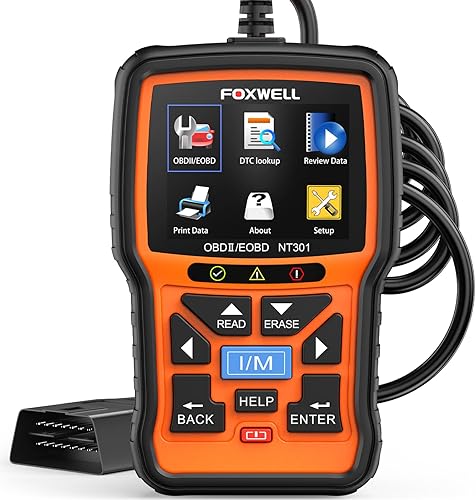
- Live data graphing
- One-click I/M readiness
- EVAP and O2 sensor tests
- 2.8-inch color screen
Graphs of sensor readings suit a DIYer tracking down an intermittent fault rather than just reading a code.
Pros
- Graphs sensor data
- EVAP and O2 tests
- Lifetime free updates
Cons
- No ABS or airbag functions
The NT301 suits a DIYer chasing a fault that only shows up while driving. It logs live sensor data in easy-to-read graphs, so you can watch oxygen sensors, fuel trims, coolant temperature and RPM and spot a value that jumps out of line.
It also measures boost levels and intake air temperatures in real time on turbo cars.
Enhanced OBD2 modes add an EVAP system check and an O2 sensor test, which help with fuel economy and emissions. A one-click I/M readiness hotkey with red, yellow and green lights gives a quick inspection status, and a speaker adds an audio cue.
A help button with a DTC guide suggests possible causes when a code appears with a question mark icon.
It covers all five OBD2 protocols and most 1996 and newer US cars, light trucks and SUVs, plus many 2000 and newer European and Asian models. Updates are free for life, though the update software runs on Windows only.
The 2.8-inch color screen stays readable in daylight. Like the other Foxwell here, it stops at engine and emissions systems and cannot handle bidirectional controls or calibration.
ANCEL AD310 Code Reader: Best for a glovebox spare

- Reads and clears engine codes
- Live data and freeze frame
- I/M readiness
- 2.5 ft insulated cable
A sturdy, simple reader with a long cable, made for quick checks and keeping in the car.
Pros
- Simple menus
- Long insulated cable
- Live data included
Cons
- No reset functions
The AD310 suits a driver who wants a sturdy reader to keep in the car. It reads and clears engine codes, shows live data and freeze frame, checks I/M readiness and collects vehicle information.
It also reads hard memory data from the emission system.
The 2.5-foot cable uses thick, flexible insulation, which matters because a scanner often ends up on the floor of a garage. It weighs 12 ounces and measures 8.9 by 6.9 by 1.4 inches, so it travels easily in a backpack or glovebox.
The buttons are clearly labelled and the screen shows results in plain text.
It supports all five OBD2 protocols and works on 1996 and newer US cars plus 2000 and newer European and Asian models, including light trucks and SUVs. Each unit gets a 48-hour aging test before it leaves the factory.
The limits are clear: it diagnoses emission-related faults only, cannot do reset functions, and needs the OBD2 port, so older OBD1 cars are out. For code reading and clearing at a low price, it is a solid spare.
ANCEL AD410 Code Reader: Best for beginners who want definitions

- 42,000+ built-in code lookups
- Live data and O2 test
- I/M readiness
- 2.4-inch color screen
The AD410 shows a plain definition for most codes on its own screen, which helps new drivers understand the light.
Pros
- Very large code library
- Color screen
- No app needed
Cons
- Engine and emissions codes only
The AD410 suits a new driver who wants to understand the light without opening a laptop. Its 42,000+ built-in code lookups put a plain definition on screen, and the menus are laid out for beginners.
You can tap a fault code to open its entry in the library.
Beyond reading and clearing, it handles live data, freeze frame, O2 sensor and EVAP tests, vehicle information and MIL status. Live readings for RPM, coolant temperature and fuel trim help you judge whether the car is running right after a repair, and you can view the whole data stream or graph a single item.
It is compatible with most 1996 and newer US cars, SUVs and light trucks, plus many 2000 and newer European and Asian models, across all five protocols. No battery, app or Bluetooth is needed.
Free software updates keep the code database current, and the update software runs on Windows 7, 8 and 10 only; Mac is not supported.
It reads engine and emission codes only, with no ABS, SRS or transmission support. That is the trade-off against the Innova, which adds limited ABS coverage.
Some European makes such as Fiat, Alfa and certain Peugeot and Renault models are also listed as not compatible, so check your car first.
Veepeak OBDCheck BLE: Best for iPhone and Android

- Bluetooth LE connection
- Works with third-party apps
- Live sensor data in the app
- Small enough to leave plugged in
A tiny Bluetooth adapter that turns your phone into the screen, with app choice deciding which features you get.
Pros
- No built-in screen to read
- Works with many apps
- Small and light
Cons
- Needs a compatible app
- Advanced functions depend on the app
The Veepeak suits a phone-first driver, especially an iPhone user, who would rather see data on a big screen. It is a tiny Bluetooth LE adapter that connects to apps such as Car Scanner ELM OBD2, OBD Fusion and Torque, and you read codes and live data in the app.
It measures 1.61 by 1.97 by 0.87 inches and comes with a mini carrying case.
That design means no built-in screen and no keypad, so the app does the work. Some apps or in-app features cost extra from their developers, and advanced functions like ABS data depend on your vehicle and the app.
It does not support specialized functions such as injector coding, EPB reset or oil service resets.
It handles standard OBD2 functions on most 1996 and newer US cars and light trucks: read and clear codes, freeze frame, I/M readiness and live sensor data. It plugs in and stays out of the way under the dash.
Pair it from inside the app, not from the phone's Bluetooth settings. It supports Bluetooth LE on iOS and Android and classic Bluetooth on Android, but not WiFi or Android head units.
For the best matching app, see our guide to the best OBD2 scanner for iPhone.
Autel AutoLink AL319: Best for quick plug-and-play checks

- One-click I/M readiness
- Live data and freeze frame
- Built-in speaker
- 7 languages
A compact reader with a one-click readiness button and a clear color screen for basic engine checks.
Pros
- One-click readiness check
- Color display
- Lifetime free updates
Cons
- No ABS or airbag codes
The AL319 suits a quick check before a shop visit. It has patented one-click I/M readiness, a color TFT screen and a built-in speaker, and it reads and clears engine codes with a plain setup.
Live data, freeze frame and vehicle information are included, and it supports 7 languages across most post-1996 OBD2 vehicles. It is plug and play, with no battery needed, so a beginner can use it without reading much.
The cable is long enough to reach the port without getting in the way.
The start sequence is simple: turn the ignition on without starting the car, plug in and read, or start the car first. Push-button cars have their own steps in the manual.
Autel offers 12 months of warranty and lifetime free updates.
Its focus is the engine and emission system, so ABS and SRS codes are out of reach. It reads engine faults and erases the code once the problem is fixed.
Of the handhelds here it offers the least live-data detail, which is why it sits at the bottom of the group.
How these OBD2 scanners compare
Screens, code libraries and extra functions separate these readers more than anything else. The table lines up the specs that matter for everyday use.
Read down the screen and protocol columns first, then look at the extras each tool lists.
| Product | Best for | Screen | Power | Cable | Our score |
|---|---|---|---|---|---|
| MOTOPOWER MP69033 Car OBD2 Scanner Code Reader | first-time buyers | 2.8 in LCD | From the OBD2 port | 2.5 ft | 9.7 |
| VDIAGTOOL VD10 OBD2 Scanner Check Engine Code | a large code library | 2.1 in LCD | From the OBD2 port | 9.1 | |
| FOXWELL NT201 OBD2 Scanner | smog check prep | 2.4 in color | From the OBD2 port | 8.9 | |
| Innova 5210 Code Reader | repair guidance | 2.8 in | Vehicle powered | 8.7 | |
| Foxwell NT301 Code Reader | graphing live data | 2.8 in color | Corded from the OBD2 port | 8.2 | |
| ANCEL AD310 Code Reader | a glovebox spare | 2.4 in | Corded from the OBD2 port | 7.7 | |
| ANCEL AD410 Code Reader | beginners who want definitions | 2.4 in color | Corded from the OBD2 port | 7.6 | |
| Veepeak OBDCheck BLE | iPhone and Android | From the OBD2 port | 7.3 | ||
| Autel AutoLink AL319 | quick plug-and-play checks | 2.4 in color | From the OBD2 port | 6.8 |
How we compared these code readers
We checked each scanner's specs, supported protocols and stated functions, then matched them to the jobs drivers actually bring to a code reader. Those jobs are reading a check engine light, preparing for an emissions test, watching live sensor data and diagnosing a fault over time.
Our score weighs specs, features and how well each tool fits what you're shopping for. A bigger code library, graphing live data and extra functions like oil reset or a battery test count in a tool's favor.
Screen size and power source also matter. A reader that runs from the OBD2 port needs no charging, and a clear screen with a backlight is easier to use in a garage.
We noted when a screen is a small two-line LCD, because that changes how much scrolling a long code definition takes.
Where a scanner covers only the engine and emissions systems, we say so, because a driver expecting ABS or airbag codes will be disappointed. We also flagged where coverage varies by vehicle, as it does on the Innova 5210.
Our guide to OBD2 scanners with live data explains what those readouts are useful for.
What should you check before buying an OBD2 scanner?
Start with the vehicle year and the port. Any 1996 or newer US car, and most 2000 and newer European or Asian models, use the standard 16-pin OBD2 connector these readers fit.
Then decide which systems you need to scan. The tools here read engine and emission codes.
ABS, airbag and transmission codes need a more expensive scanner, so check that before you buy.
Which OBD2 protocols do I need?
All five matter: CAN, ISO9141, KWP2000, J1850 PWM and J1850 VPW. Each pick in this list supports all five, which covers the protocol split across US, European and Asian cars.
Every scanner here states support for the full set, so protocol coverage rarely decides the choice.
The MOTOPOWER goes a step further and lists 9 protocols, which covers the older split without you checking the label.
Do I need live data?
Live data is worth it if you plan to keep the car and diagnose faults yourself. It shows RPM, coolant temperature, fuel trims and oxygen sensor readings in real time, which helps spot a sensor that is drifting before it fails.
For someone who only wants to know why the light is on, a reader that shows codes and their definitions is enough. The MOTOPOWER and VD10 both sit in the middle, with live data included.
The Foxwell NT301 is the step up when you want that data drawn as a graph.
Handheld or Bluetooth, which is easier?
A handheld has its own screen and keypad, so it works in any car with no setup. A Bluetooth adapter needs a compatible app on your phone and a connection each time.
The Veepeak also asks you to pair from inside the app, not from the phone's settings.
Handhelds suit a shared family car or a garage toolbox. Bluetooth suits someone who already keeps a phone mount in the car and wants the data on a larger screen.
If you often scan cars you do not own, a handheld saves the app install.
What does a bigger code library get you?
A bigger library means the scanner shows the meaning on its own screen instead of sending you to a search. The VD10 holds more than 3000 definitions and the AD410 holds more than 42,000 lookups.
That matters most for maker-specific codes, which generic readers often leave as a bare number.
Does the screen size matter on a code reader?
Yes, especially for live data. A 2.8-inch screen like the MOTOPOWER, Innova 5210 or Foxwell NT301 shows a code definition and a data line without much scrolling.
Two-line LCDs like the VD10 wrap longer text.
Text size matters more than raw inches. A backlit screen with contrast adjustment is easier to read in a dim garage than a larger unlit one.
Color helps too: the Foxwell NT201 uses red, yellow and green for readiness, and the Autel AL319 uses a color TFT panel.
Do these scanners work on older or imported cars?
Most do, with limits. US cars from 1996 onward use OBD2, and many European and Asian models from 2000 onward do too.
The Foxwell NT301 also covers many 12V diesel vehicles fitted with OBD2.
Cars older than 1996 use OBD1, which needs a different tool and adapter. The ANCEL AD310 is a clear example: it will not diagnose an OBD1 car even with an adapter.
For a specific brand, our guide to the best OBD2 code reader for Volvo covers the coverage points to check.
What can a code reader not tell you?
It cannot name the failed part. A code points to a circuit or a system, and you still trace wiring, vacuum lines or sensors to find the cause.
It also cannot clear a light for good if the fault is still present. The Foxwell NT301 spells this out: clear the light only after the repair, or the code will come back.
Clearing codes wipes emission monitor results, so the car needs a full drive cycle to set them again. Scan first, repair, then clear.
On the Innova 5210, expect the readiness monitors to repopulate only after that full drive cycle, which is normal vehicle behavior and not a fault in the tool.
Which OBD2 scanner should you buy?
The best OBD2 code reader and scanner for most drivers is the MOTOPOWER MP69033, with a clear screen, live data and a low price. Pick the VDIAGTOOL VD10 for its large code library, or the Foxwell NT201 if a smog test is coming.
Choose the Innova 5210 if you want repair guidance and oil reset, and the Veepeak if you prefer scanning from your phone. Whatever you pick from this list, it will read the codes behind a check engine light on any 1996 or newer car.
Our top 3 picks at a glance
-
1
Best for first-time buyers
MOTOPOWER MP69033 Car OBD2 Scanner Code Reader
9.7/10 our score
See it on Amazon -
2
Best for a large code library
VDIAGTOOL VD10 OBD2 Scanner Check Engine Code
9.1/10 our score
See it on Amazon -
3
Frequently asked questions
Do cheap OBD2 scanners really work?
Yes, for engine and emissions codes on any 1996 or newer US vehicle. The cheapest readers handle the same standard OBD2 protocols as pricier ones.
You pay more for live data, bigger code libraries or extra systems like ABS.
Will a code reader tell me exactly what part to replace?
No. A reader gives you the fault code and its standard definition, such as a lean fuel condition or a misfire.
You still trace that code to the sensor, wiring or vacuum leak behind it before replacing anything.
Can I leave an OBD2 scanner plugged in all the time?
A Bluetooth adapter like the Veepeak can stay in the port because it is small and the socket is designed to sit under the dash.
A handheld with a cable sticks out and can catch on your knee, so unplug it after each scan.
Why does a code come back after I clear it?
Clearing only erases the stored code. If the fault is still present, the computer sees it again and the light returns, often within a few drive cycles.
Read and record the code first, then repair the cause before clearing.
Does clearing codes reset readiness monitors?
Yes. Clearing codes wipes the emission monitor results, and the car needs a full drive cycle to set them again.
If you have an emissions test soon, scan first and clear only after the repair.