9 Best OBD2 Scanners for Hyundai (November 2026)
The best OBD2 scanners for Hyundai cars include the MOTOPOWER MP69033 Car OBD2 Scanner Code Reader for most Hyundai owners, the Zmoon ZM201 Professional OBD2 Scanner Diagnostic Tool for pre-smog checks, and the VDIAGTOOL VD10 OBD2 Scanner Check Engine Code for used Hyundais.
On this page (8 sections)
- The best OBD2 scanners for Hyundai at a glance
- How these OBD2 scanners for Hyundai were compared
- Which Hyundai faults can an OBD2 scanner read?
- Do you need enhanced Hyundai coverage or is generic enough?
- Handheld or phone app: which suits a Hyundai owner?
- How much live data do you need?
- What should you check before buying a scanner for your Hyundai?
- Verdict: the right scanner for your Hyundai
The best OBD2 scanner for Hyundai for most drivers is the MOTOPOWER MP69033, a cheap handheld that reads and clears engine codes on every Hyundai built since 1996. If your warning light points to ABS, airbag or transmission faults, the Foxwell NT604 Elite is the stronger pick.
Buying a scanner for a Hyundai is mostly about matching the tool to the system you want to check. A check engine light is an engine and emissions matter, while an airbag or ABS warning sits in a different control module.
That split explains why two very different tools head this list. One costs little and reads basic codes.
The other scans the four systems a Hyundai dashboard warning most often comes from.
Hyundai has sold cars in the US under the standard OBD2 rule since 1996, and every model since uses the same 16-pin port under the dash. So the plug is never the problem.
What changes across the range, from an old Elantra to a recent Tucson or Santa Fe, is how much of the car a scanner can see and how clearly it explains what it finds.
Our picks at a glance
-
1
 Best for most Hyundai owners
MOTOPOWER MP69033 Car OBD2 Scanner Code Reader
9.7/10 our score
See it on Amazon -
2
 Best for pre-smog checks
Zmoon ZM201 Professional OBD2 Scanner Diagnostic Tool
9.5/10 our score
See it on Amazon -
3
 Best for used Hyundais
VDIAGTOOL VD10 OBD2 Scanner Check Engine Code
9.1/10 our score
See it on Amazon
The best OBD2 scanners for Hyundai at a glance
The MOTOPOWER MP69033 is the all-round winner, and each other pick covers a specific job better than the rest. The list runs from highest to lowest score, so start at the top and work down to the feature you need.
The first five picks read codes on a screen in the car, and the BlueDriver hands that job to your phone.
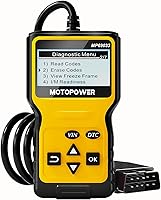
MOTOPOWER MP69033 Car OBD2 Scanner Code Reader: Best for most Hyundai owners
- Built-in DTC lookup
- 2.8 in LCD screen
- Reads live data and freeze frame
- Powers from the OBDII port
A simple engine code reader that turns off the check engine light and shows live sensor data on Hyundais from 1996 on.
Pros
- Reads and clears engine codes
- No battery needed
- Live data and freeze frame
Cons
- No ABS or airbag codes
- Basic LCD screen
MOTOPOWER's reader suits the owner who sees a check engine light and wants an answer without a trip to a shop. It reads and clears engine codes, shows the freeze frame and displays live data on a 2.8 in LCD screen with an adjustable backlight.
The built-in code database matters here. You look up the fault on the screen instead of searching online, and the quick-query buttons pull the VIN and the current code in one press.
It supports all nine OBD2 protocols used by 1996 and newer US, 2000 and newer European and newer Asian cars, so it fits any Hyundai that has the standard port. Six languages are available, and the 2.5 ft cable is wrapped in thick flexible insulation that survives being dropped on a garage floor.
The trade-off is scope. It handles engine and emissions codes and nothing else, so it cannot read ABS, airbag or oil service lights.
If your Hyundai shows one of those, this tool won't see it, and you would move up to the Foxwell NT604 Elite or BlueDriver instead.
Zmoon ZM201 Professional OBD2 Scanner Diagnostic Tool: Best for pre-smog checks
- 2.8 in color screen
- Live data and freeze frame
- I/M readiness
- Built-in DTC database
A color-screen engine reader with I/M readiness and EVAP checks that help a Hyundai pass an emissions test.
Pros
- Color display with brightness control
- I/M readiness before a smog test
- Built-in database of fault codes
Cons
- No ABS
- SRS or transmission codes
- PC software is Windows only
The Zmoon ZM201 suits a Hyundai owner facing an emissions test or a yearly inspection. Its I/M readiness screen shows whether the tests required for a pass have finished running, and the EVAP and O2 sensor checks help spot a fault before the test does.
The 2.8 in color display is the daily difference from a cheap two-line reader. Brightness adjusts, light and dark themes are available, and the menu uses shortcut keys rather than a scroll hunt.
A row of status indicators shows the vehicle state at a glance.
It reads and clears codes, shows the VIN and stores freeze frame data. Live data appears as graphs, which makes a sensor problem easier to spot than watching numbers flicker, and the built-in database holds more than 50,000 fault codes.
Power comes from the port, so there's no battery to charge. The trade-off against the MOTOPOWER is price and complexity, and like every engine reader here it can't see ABS or SRS codes.
It does add a three-year warranty and free lifetime software updates.
VDIAGTOOL VD10 OBD2 Scanner Check Engine Code: Best for used Hyundais
- Live data and freeze frame
- I/M readiness
- Vehicle information and VIN
- Six languages
A plug-and-play reader that pulls the VIN and calibration IDs, handy for checking a second-hand Hyundai before you buy.
Pros
- Retrieves VIN and calibration IDs
- Freeze frame and live data
- Five-year warranty
Cons
- Small two-line screen
- Engine codes only
This VDIAGTOOL model fits the buyer inspecting a used Hyundai before handing over money. It retrieves the VIN, the calibration IDs and the calibration verification numbers, so you can check that the engine computer matches the car and hasn't been swapped.
The freeze frame function is the other useful part. It stores the sensor readings at the moment the fault was logged, which helps explain an intermittent misfire or sensor error that only shows up on some drives.
The two-line screen is small compared with the color models above, but the menu is short and the tool is plug and play. It reads generic and manufacturer-specific codes and shows definitions from a database of more than 3,000 entries.
It runs on all five OBD2 protocols and covers post-1996 US, post-2006 European and post-2009 Asian vehicles, so any Hyundai here qualifies. Engine codes only, same as the others in this group, and the small screen is the main reason it sits below the Zmoon.
BlueDriver Bluetooth OBD2 Scanner: Best Bluetooth pick for enhanced Hyundai codes

- Phone app for iOS and Android
- ABS and SRS on supported vehicles
- Repair reports matched to VIN
- Live data
A wireless dongle that adds ABS, SRS, airbag and TPMS codes on supported Hyundais through a phone app, with no subscription.
Pros
- Enhanced Hyundai coverage on supported models
- ABS and SRS codes included
- No subscription fees
Cons
- Costs more than a basic reader
- Needs your phone every time
BlueDriver is the pick when your Hyundai has a warning beyond the engine. Supported models get enhanced diagnostics for check engine, ABS, SRS, airbag and TPMS codes, plus a repair report matched to your VIN that shows the cause and confirmed fix.
The phone app replaces the onboard screen. You plug the dongle into the OBD2 port, pair it with iOS or Android and read everything on the phone, including live data while you drive, freeze frames, smog readiness and Mode 6 test results.
There are no subscription fees and no account required, which separates it from a lot of app-based scanners. Free app updates are included, and support runs 24/7 in North America.
Coverage is strongest on the major makes, with enhanced communication on select 2024 and newer models.
The trade-off is dependence on your phone and a higher price than the handhelds. If you want a tool that works with the phone in your pocket and reads airbag codes, few things beat it.
Read our iPhone scanner roundup if you're building a phone-based kit.
Foxwell NT604 Elite Scanner: Best for ABS and airbag codes

- ABS
- SRS
- engine and transmission
- 4.3 in screen
- Live data and data print
- Solid protective case
A handheld that scans the four systems a Hyundai warning light most often points to, with a full-color screen and a hard case.
Pros
- Reads ABS
- SRS and transmission codes
- Large color screen
- Protective case in the box
Cons
- No oil reset or battery registration
- Largest tool here
The NT604 Elite is the answer when a Hyundai ABS, airbag or transmission light comes on. It scans all four common systems: engine, ABS, SRS and transmission, and shows live data, a built-in code library, data playback and print on a 4.3 in screen.
The AUTOVIN menu reads the VIN and vehicle details in one step, which saves typing it in by hand. The tool covers more than 60 brands across America, Asia and Europe, and there's no extra software fee.
If AUTOVIN fails on an older car, you type the VIN or pick the model from the diagnostic menu.
Foxwell ships it in a solid protective case rather than a plastic bag, and updates are free for life. That matters on a tool you'll keep in a garage.
Two limits to know. It reads and clears codes but doesn't do service functions such as oil reset, battery registration or ABS bleeding, and crash data can't be cleared.
Compared with the engine-only picks, though, it's the one that sees the whole dashboard.
Foxwell NT301 Code Reader: Best for check engine basics
- Check engine and emissions codes
- O2 sensor and EVAP tests
- Live data graphs
- I/M readiness hotkeys
An engine-only reader with one-key I/M readiness lights that show whether your Hyundai is ready for an inspection.
Pros
- One-key I/M readiness
- Live data graphing
- Built-in O2 and EVAP tests
Cons
- No ABS or airbag support
- Basic engine-only scope
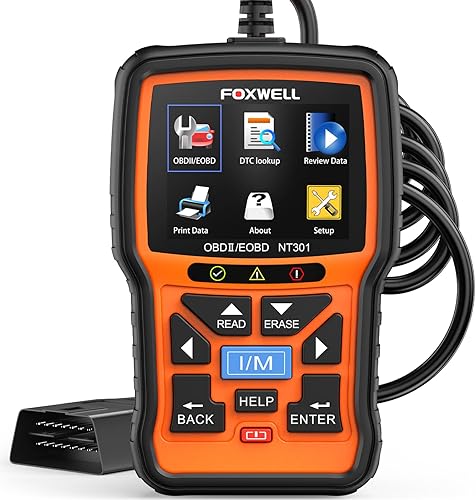
The Foxwell NT301 is a sensible middle step for a Hyundai owner whose warnings are always engine and emissions related. It reads and clears check engine codes, then uses three colored LEDs to show whether the car is ready for an inspection.
The lights are the feature to pick it for. Red means a repair is needed, yellow means diagnosis is in order and green means ready, all without scrolling a menu.
One-key I/M readiness hotkeys do the same job faster, and a built-in speaker gives an audible cue.
It also runs an EVAP check and an O2 sensor test, and it graphs live data such as RPM, coolant temperature and fuel trims. The 2.8 in color screen is readable in daylight, and a help button explains a code and its likely causes.
Its trade-off is the same as the MOTOPOWER's: engine codes only. It won't touch ABS, airbag or transmission faults, and it can't do resets.
For basic engine work it's quick and well built.
ANCEL AD310 Code Reader: Best budget engine reader

- Reads and clears engine codes
- Live data and freeze frame
- I/M readiness
- All OBD2 protocols
A rugged, popular entry reader that covers the emission-related codes a Hyundai throws most often.
Pros
- Thick insulated cable
- Light and portable
- Reads live data
Cons
- Emission-related codes only
- No color screen
The ANCEL AD310 is the low-cost entry point. It reads and clears emission-related engine codes, shows live data and freeze frame, checks I/M readiness and collects vehicle information, all on a 2.4 in screen.
Its thick insulated cable is built for garage life. The body is compact and light enough to slide into a backpack, and the buttons are clearly labeled with a readable screen.
It runs those checks after you fix a problem, so you can confirm the fault is gone before clearing it.
Power comes from the port, so there's no charger to lose. It supports all five OBD2 protocols and works on 1996 and newer US cars, plus 2000 and newer European and Asian models.
The limit is real: only emission-related codes. An engine fault outside that system won't be read, and there's no reset function.
For a quick check engine answer on a Hyundai, though, it does the job at the lowest price here.
ANCEL AD410 Code Reader: Best for beginners

- Built-in DTC definitions
- Live data in graphs
- I/M readiness
- No app needed
A plug-and-play reader with 42,000 built-in code definitions that suit a first-time Hyundai owner.
Pros
- Code definitions on screen
- No app or battery
- Color display
Cons
- Engine and emission codes only
- Small screen
The ANCEL AD410 suits a first-time Hyundai owner who wants plain language on the screen. It carries 42,000 built-in code definitions, so a fault code is explained in the car rather than online, and it reads and clears engine codes to turn off the check engine light.
Beyond codes, it shows live data in graphs (RPM, coolant temperature, fuel trim, oxygen sensor readings), freeze frame, O2 sensor and EVAP tests, and I/M readiness before a smog check. The readiness screen matters if a recent repair reset the monitors and you need to know they have run again.
The 2.4 in color display and short menu keep setup simple. There's no app, battery or Bluetooth pairing: plug it into the 16-pin port, switch the ignition on and scan.
The trade-off against the MOTOPOWER is a smaller screen and a lower score. It also sticks to engine and emission codes, with no ABS, SRS or transmission support.
For a beginner on a budget it's a friendly start.
Autel AutoLink AL319: Best glovebox spare

- Reads and clears DTCs
- Live data and freeze frame
- One-click I/M readiness
- Seven languages
A small, cheap engine reader that fits in a glovebox and covers the basics on an older Hyundai.
Pros
- Compact body
- One-click I/M readiness
- Seven languages
Cons
- Engine and emission systems only
- Least capable pick here
The Autel AL319 is the glovebox spare. It's small, cheap and does the basics: read and clear codes, look up definitions, show live data and freeze frame, and check I/M readiness in one click.
Its patented one-click readiness button and TFT color display are more than you'd expect at this end of the market, and it supports seven languages. The cable is long enough to reach the port without trailing on the floor, and the tool needs no batteries.
It covers most post-1996 OBD2 vehicles. The menu is simple enough that you can leave it in the car and use it without a manual.
For a second car or an older Hyundai used for short trips, it's a handy tool to keep close.
The trade-off is capability. It's engine and emissions only, the screen is the smallest here and the score reflects that.
Buy it as a backup, not as your only scanner if you plan deeper work.
How these OBD2 scanners for Hyundai were compared
We compared the tools on the systems each one reads, the data it shows and how it gets power, then weighed that against what a Hyundai owner usually needs. Engine-only readers score high when they're cheap, quick and clear, because most Hyundai warnings are engine or emissions faults.
Tools move up the list when they add coverage a basic reader can't give. ABS, SRS and transmission diagnostics and enhanced make-specific codes cost more, so they earn their place here as picks for specific jobs rather than as the default.
A phone dongle and a handheld with the same engine-only scope don't deserve the same score.
Screen quality, code database size and power source decide the rest. A color screen with adjustable brightness beats a two-line LCD in daylight, and a reader that draws power from the port saves you a battery change.
Connection type splits the list too: a Bluetooth tool needs a charged phone, while a handheld works on its own.
Our score weighs specs, features and buyer feedback against what you're shopping for. Pricing sits outside the score, and we grouped the readers by the job each does best so the list is easy to use.
| Product | Best for | Screen | Power | Systems | Our score |
|---|---|---|---|---|---|
| MOTOPOWER MP69033 Car OBD2 Scanner Code Reader | most Hyundai owners | 2.8 in LCD | Vehicle OBDII port | Engine only | 9.7 |
| Zmoon ZM201 Professional OBD2 Scanner Diagnostic Tool | pre-smog checks | 2.8 in color | Vehicle OBDII port | Engine only | 9.5 |
| VDIAGTOOL VD10 OBD2 Scanner Check Engine Code | used Hyundais | 2.1 in LCD | OBD2 port | Engine only | 9.1 |
| BlueDriver Bluetooth OBD2 Scanner | Bluetooth pick for enhanced Hyundai codes | Vehicle OBDII port | 9.0 | ||
| Foxwell NT604 Elite Scanner | ABS and airbag codes | 4.3 in | Corded electric | Engine | 8.5 |
| Foxwell NT301 Code Reader | check engine basics | 2.8 in color | Corded electric | Engine only | 8.2 |
| ANCEL AD310 Code Reader | budget engine reader | 2.4 in | Corded electric | Engine only | 7.7 |
| ANCEL AD410 Code Reader | beginners | 2.4 in color | OBD2 port | Engine only | 7.6 |
| Autel AutoLink AL319 | glovebox spare | 2.4 in | Corded electric | Engine only | 6.8 |
Which Hyundai faults can an OBD2 scanner read?
A basic OBD2 scanner reads engine and emissions codes on any Hyundai from 1996 on. Airbag, ABS and transmission codes live in separate modules and need a tool with coverage for those systems, such as the Foxwell NT604 Elite or BlueDriver.
This is the single most common source of disappointment with a new scanner. The check engine light is an engine system warning, so a cheap reader handles it.
An airbag light is not.
Engine and emissions codes
Every pick here reads these. That covers the check engine light, misfires, oxygen sensor faults, EVAP leaks and I/M readiness for an inspection.
The freeze frame and live data on the MOTOPOWER, Zmoon and Foxwell tools help you go further than the code itself.
ABS, airbag and transmission codes
These need the higher-tier tools. The NT604 Elite and BlueDriver read them on supported Hyundais.
If your dashboard shows an ABS or airbag warning, skip the budget readers. The NT604 Elite scans all four systems directly, while BlueDriver reaches them through the app on supported models.
Do you need enhanced Hyundai coverage or is generic enough?
Generic OBD2 coverage is enough for engine and emissions work on any Hyundai. Enhanced coverage adds the manufacturer-specific codes and live data that a dealer tool would show, and only the Bluetooth and pro-level picks here offer it.
What enhanced coverage adds
Enhanced mode reads codes outside the standard set, including body, chassis and transmission faults on supported models. It's what lets a phone app or a pro tool see a warning that a basic reader ignores.
BlueDriver pairs it with repair reports matched to your VIN, and the NT604 Elite covers 60+ brands with no extra software fee.
When generic is the right choice
If your only problem is a check engine light after a fill-up or a rough idle, a generic reader solves it. Start with the MOTOPOWER and save the money for the repair itself.
Owners cross-shopping other brands can compare our VW and Audi scanner guide or the Chevy list for how coverage differs by make.
Handheld or phone app: which suits a Hyundai owner?
A handheld reader works without a phone and shows everything on its own screen, while a Bluetooth app like BlueDriver adds ABS and SRS coverage and repair reports. Pick handheld for simplicity, app for depth on supported models.
Handheld scanners
The MOTOPOWER, Zmoon, VDIAGTOOL, Foxwell and ANCEL tools here all run standalone. There's no pairing, no app update and no phone battery to worry about.
Screens range from the 2.1 in two-line display on the VDIAGTOOL to the 4.3 in color panel on the NT604 Elite, so there's a size for every taste. For a quick check in a parking lot, that simplicity wins.
Phone-based scanners
BlueDriver turns your phone into the display. You get live data as you drive, VIN-matched repair reports and enhanced codes on supported Hyundais.
The app runs on iOS and Android, and the dongle plugs straight into the port with no cable. The catch is that you need your phone with you and the app installed.
How much live data do you need?
Live data is worth having on any Hyundai because it turns a code into a diagnosis. The MOTOPOWER, Zmoon, VDIAGTOOL, Foxwell and ANCEL tools all show live sensor readings, so you can watch a value move instead of guessing.
The more detailed the display, the easier that is. Graphs beat raw numbers when you're watching an oxygen sensor switch or a fuel trim drift, and the Zmoon, NT301 and AD410 all graph their readings.
Our live data scanner roundup compares the screens and graphing options in more depth.
Reading a code without live data
A code alone tells you which circuit or sensor logged a fault. That's often enough to know whether the fix is a sensor, a hose or a gas cap, and it's all a budget reader needs to do.
The built-in definitions on the MOTOPOWER and AD410 mean you don't need a second screen to look the code up.
Using live data to confirm a fix
After a repair, live data shows whether the reading has returned to normal before you clear the code. Watch the sensor at idle, then at a steady speed, and compare with the expected range.
The NT301 and Zmoon can store a freeze frame so you keep the readings from the moment of the fault.
What should you check before buying a scanner for your Hyundai?
Check three things: the port, the year and the systems you need. Every Hyundai from 1996 on has the standard 16-pin OBD2 port, so port compatibility is rarely the problem.
The year and the warning light are what decide the tool.
The model year
A 1996 or newer Hyundai uses OBD2. Older cars used a different system and won't work with these tools, even with an adapter.
Most readers here list the year ranges they support, and the newer tools such as the Zmoon also note that hybrid and electric models may fall outside standard OBD2 coverage.
The warning light you're chasing
An engine light needs an engine reader. An ABS or airbag light needs a tool with that coverage.
Match the tool to the light, not to the price. If you see more than one warning at once, a multi-system tool like the NT604 Elite saves buying twice.
Whether you want updates
Several picks here get free software updates, including the Zmoon and the Foxwell tools. Updates keep the code database current as new models appear, and they're worth checking before you commit.
The VDIAGTOOL and MOTOPOWER list long warranty terms, while the Autel and Foxwell NT301 cover a shorter first year.
Verdict: the right scanner for your Hyundai
The best OBD2 scanner for Hyundai for most owners is still the MOTOPOWER MP69033, since it reads and clears engine codes on any Hyundai from 1996 on and shows live data without a battery or a phone.
Step up to the Zmoon ZM201 if you want a color screen and I/M readiness before an inspection. Go to the Foxwell NT604 Elite or BlueDriver when the warning involves ABS, airbags or the transmission.
And keep the Autel AL319 in the glovebox as a cheap backup.
Whichever you choose, match the tool to the system you need to read. That one decision matters more than any feature on the box.
Our top 3 picks at a glance
-
1
Best for most Hyundai owners
MOTOPOWER MP69033 Car OBD2 Scanner Code Reader
9.7/10 our score
See it on Amazon -
2
Best for pre-smog checks
Zmoon ZM201 Professional OBD2 Scanner Diagnostic Tool
9.5/10 our score
See it on Amazon -
3
Best for used Hyundais
VDIAGTOOL VD10 OBD2 Scanner Check Engine Code
9.1/10 our score
See it on Amazon
Frequently asked questions
Will a generic OBD2 scanner work on a Hyundai?
Yes. Every Hyundai sold in the US since 1996 uses the standard 16-pin OBD2 port, so a generic engine code reader works.
Enhanced ABS, airbag and transmission codes need a tool with Hyundai-specific coverage.
Why won't my scanner clear the check engine light on my Hyundai?
The scanner can clear the stored code, but if the fault is still present the light returns after a drive cycle. Fix the cause first, such as a loose gas cap or failing sensor, then clear the code.
Can an OBD2 scanner read Hyundai airbag codes?
Only a tool with SRS coverage can. The Foxwell NT604 Elite and BlueDriver read airbag codes on supported Hyundais.
Basic engine readers like the MOTOPOWER cannot.
Does a Hyundai need a special OBD2 scanner for live data?
No. Any reader with a live data function shows the standard sensors, such as RPM, coolant temperature and fuel trim.
The MOTOPOWER and Zmoon both display that data on their screens.
Where is the OBD2 port on a Hyundai?
It is usually under the left side of the dashboard, near the steering column and just above the pedals. Look for a 16-pin trapezoid-shaped socket.